Data engineering / Tutorial
Sync Postgres to a Data Warehouse with Airbyte in 30 Minutes (and What Breaks)
Set up Postgres-to-BigQuery replication with Airbyte CDC, then diagnose six failures involving WAL, permissions, data types, keys, and schema changes.
Moving rows from Postgres into a warehouse is easy to start. Keeping the copy correct after updates, deletes, permission changes, and failed syncs is the real job.
In this tutorial, you will build a Postgres-to-BigQuery pipeline with Airbyte and change data capture (CDC). The first run takes a snapshot of two tables. Later runs read Postgres’s write-ahead log, so inserts, updates, and deletes reach the warehouse without rescanning every row.
Then we will examine the failure modes that matter in production: retained WAL, incomplete publications, missing grants, lossy type conversions, tables without primary keys, and schema changes.
This setup is for developers and small data teams that need analytics data in a warehouse without maintaining a custom replication service.
What you will build
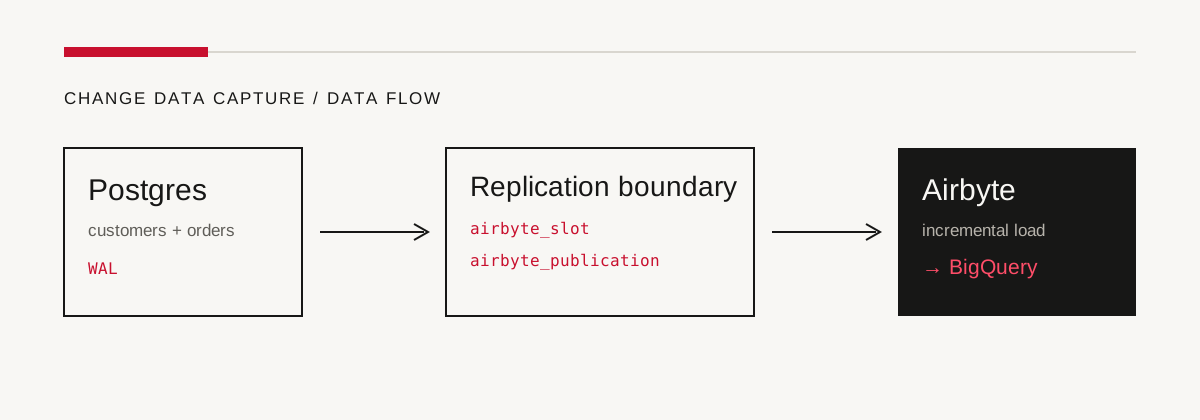
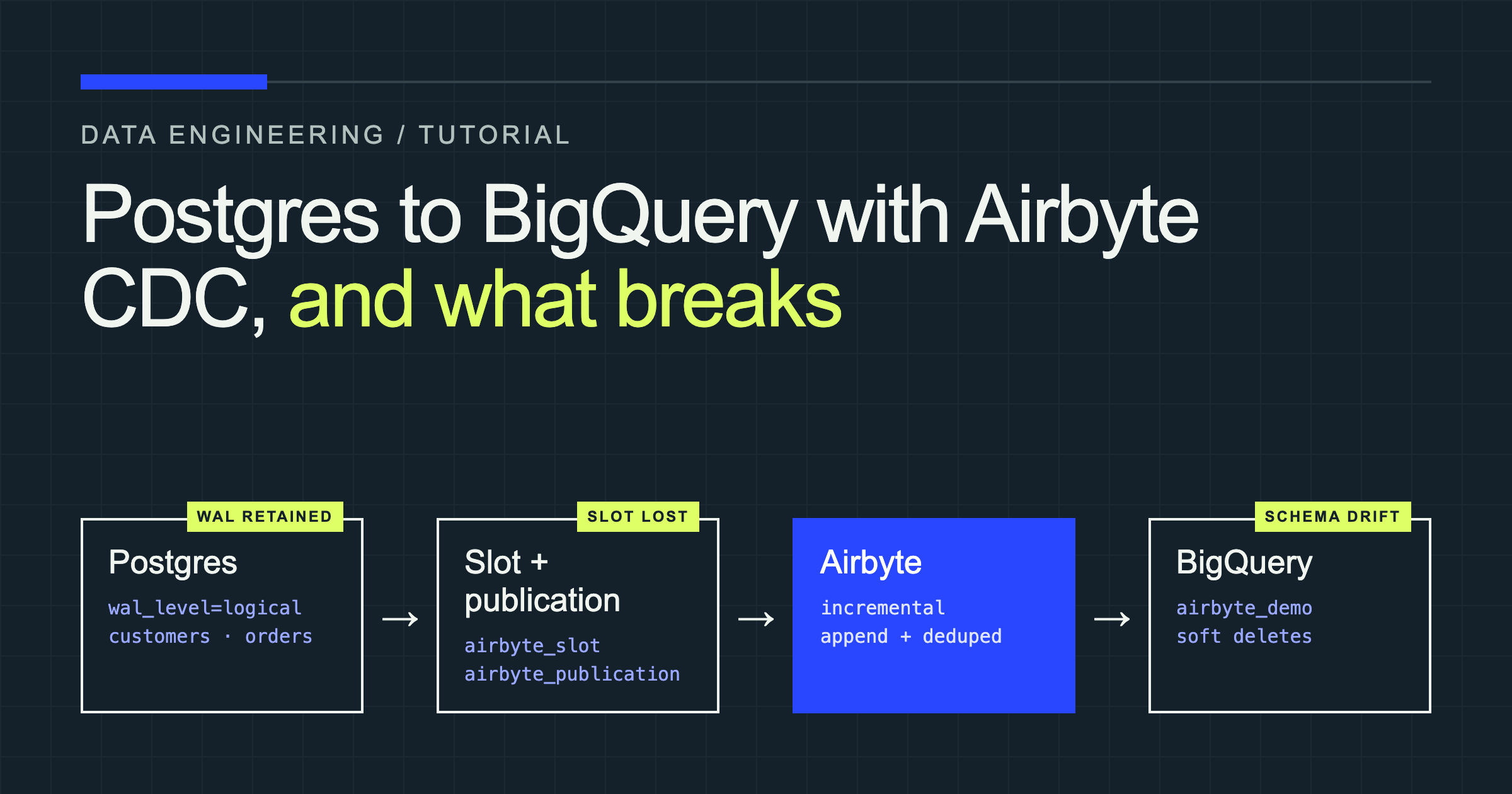
Postgres records row changes in the WAL. A logical replication slot remembers how far Airbyte has read, while a publication controls which tables Airbyte may receive. Airbyte periodically consumes those changes and loads them into BigQuery.
| Task | Working time |
|---|---|
| Start Postgres and load seed data | 5 minutes |
| Prepare Postgres for CDC | 8 minutes |
| Configure the Airbyte source | 5 minutes |
| Configure BigQuery | 5 minutes |
| Run and verify the first sync | 7 minutes |
Prerequisites
This walkthrough uses one path from start to finish:
- Postgres 14 or newer, running locally in Docker with logical replication enabled.
- Airbyte Open Source, installed locally with
abctl. - BigQuery, using Batched Standard Inserts for the smallest amount of setup.
- A Google Cloud project, a dataset, and a service-account JSON key.
BigQuery’s free usage tier currently includes 10 GiB of storage and 1 TiB of query processing per month, which is ample for this tiny dataset. Billing, organization policy, and service-account-key rules can still affect your setup.
Airbyte Cloud also works, but the network path is different. Cloud requires TLS or an SSH tunnel, and it cannot connect directly to a database on localhost or a private address. The Postgres connector documentation covers its allowlist and tunnel requirements.
Start Postgres
Run Postgres with logical WAL enabled. The last setting caps how much WAL an abandoned slot may retain; choose a value that matches your recovery window and disk capacity rather than copying 1GB blindly into production.
services:
  postgres:
    image: postgres:17
    environment:
      POSTGRES_DB: app
      POSTGRES_PASSWORD: postgres
    command:
      - postgres
      - -c
      - wal_level=logical
      - -c
      - max_wal_senders=5
      - -c
      - max_replication_slots=5
      - -c
      - max_slot_wal_keep_size=1GB
    ports:
      - "5432:5432"
    healthcheck:
      test: ["CMD-SHELL", "pg_isready -U postgres -d app"]
      interval: 5s
      timeout: 5s
      retries: 10
docker compose up -dDownload the seed and CDC setup script, save it as setup.sql, and run it:
docker compose exec -T postgres psql -U postgres -d app < setup.sqlThe script creates customers and orders, adds three customers and three orders, and prepares the Airbyte role and publication. Change the example password before using it anywhere beyond a disposable local database.
Step 1: Prepare Postgres for CDC
CDC needs four pieces of Postgres configuration. Each has a narrow purpose:
wal_level = logicalwrites enough information to reconstruct logical row changes.max_wal_sendersreserves processes that can stream WAL.max_replication_slotslimits the number of consumers that can retain WAL.REPLICATIONlets the Airbyte role read through a logical slot.
The Docker command above sets the server parameters. Confirm them before continuing:
SHOW wal_level;
SHOW max_wal_senders;
SHOW max_replication_slots;
SHOW max_slot_wal_keep_size;
For a self-managed server, make equivalent changes in postgresql.conf and restart Postgres. On Amazon RDS, set rds.logical_replication = 1 in the parameter group. On Aurora PostgreSQL, Airbyte also instructs you to set rds.logical_wal_cache = 0 because Aurora’s CDC cache is incompatible with Airbyte’s implementation.
Create a least-privilege replication user
The Airbyte role needs database access, schema visibility, read access to the selected tables, and replication permission. Default privileges cover tables created by the same owner later.
CREATE ROLE airbyte
  LOGIN
  PASSWORD 'replace-this-password'
  REPLICATION;

GRANT CONNECT ON DATABASE app TO airbyte;
GRANT USAGE ON SCHEMA public TO airbyte;
GRANT SELECT ON ALL TABLES IN SCHEMA public TO airbyte;
ALTER DEFAULT PRIVILEGES IN SCHEMA public
  GRANT SELECT ON TABLES TO airbyte;
Do not give this role ownership of application tables. If a different role creates future tables, run ALTER DEFAULT PRIVILEGES as that owner or grant SELECT explicitly.
Create one slot for this Airbyte source
A slot stores Airbyte’s position in the WAL. Airbyte requires pgoutput, and its docs specify that a slot must belong to only one configured source.
SELECT pg_create_logical_replication_slot('airbyte_slot', 'pgoutput');Set replica identity and create the publication
Replica identity tells Postgres how to identify a changed row. DEFAULT uses the primary key and is the right choice for both tutorial tables.
ALTER TABLE public.customers REPLICA IDENTITY DEFAULT;
ALTER TABLE public.orders REPLICA IDENTITY DEFAULT;

CREATE PUBLICATION airbyte_publication
  FOR TABLE public.customers, public.orders;
REPLICA IDENTITY FULL writes the old values of all columns needed to identify a row. Use it only when the key or large TOAST-able values require it: it produces more WAL and makes updates heavier.
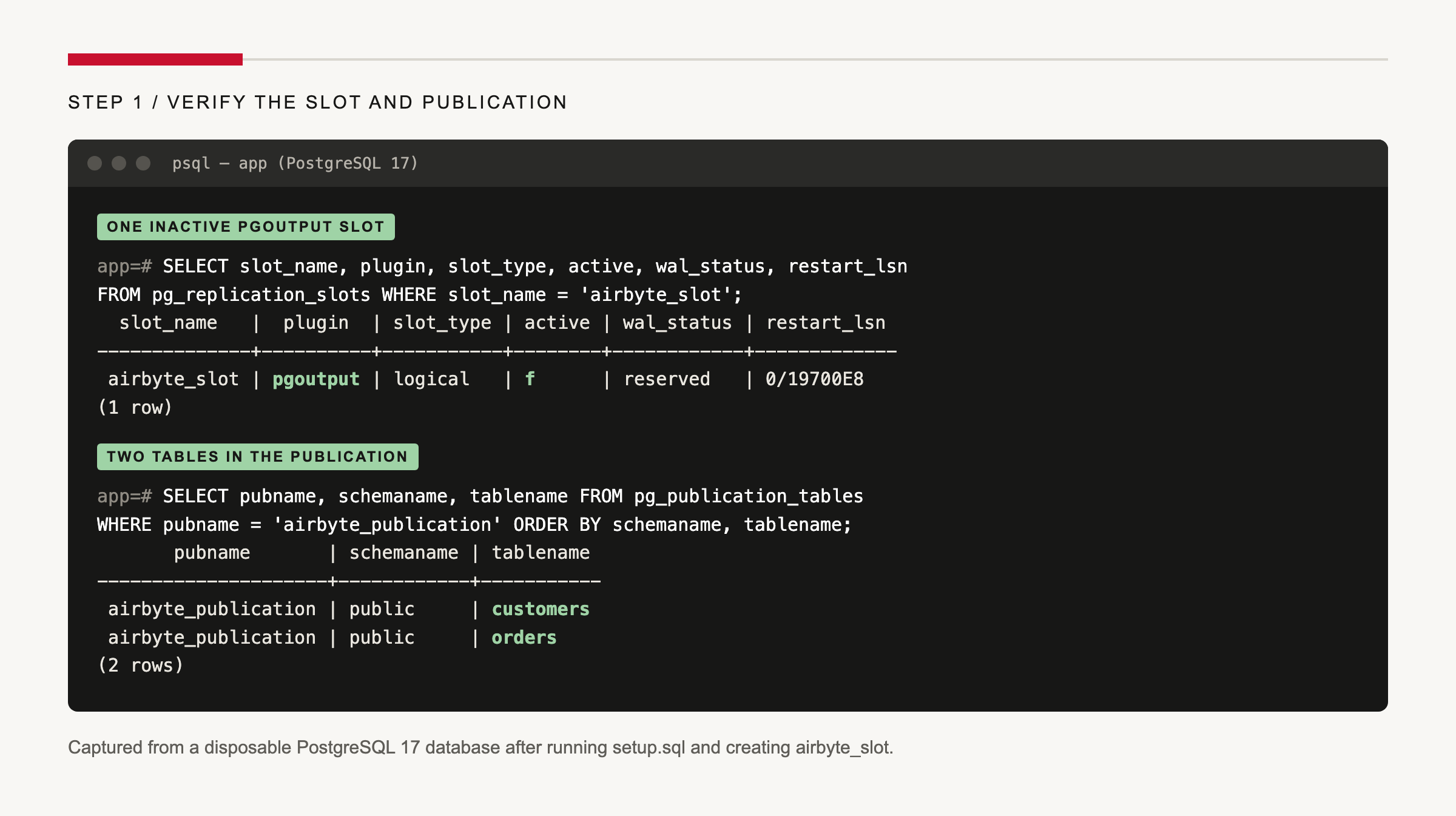
Verify the slot and publication:
SELECT slot_name, plugin, slot_type, active, wal_status, restart_lsn
FROM pg_replication_slots
WHERE slot_name = 'airbyte_slot';

SELECT pubname, schemaname, tablename
FROM pg_publication_tables
WHERE pubname = 'airbyte_publication'
ORDER BY schemaname, tablename;
You should see one inactive pgoutput slot and two publication rows. The slot becomes active while Airbyte reads it.
Step 2: Install Airbyte and add Postgres
Install Airbyte’s current command-line tool on macOS or Linux:
curl -LsfS https://get.airbyte.com | bash -
abctl local install
When installation completes, open http://localhost:8000. Retrieve the generated login details with:
abctl local credentialsIn Airbyte, go to Sources, search for Postgres, and create a source with these values:
| Field | Value |
|---|---|
| Host | host.docker.internal on Docker Desktop |
| Port | 5432 |
| Database Name | app |
| Schemas | public |
| Username | airbyte |
| Password | the password from the SQL script |
| SSL Mode | disable for this local-only connection |
| Update Method | Read Changes using Change Data Capture (CDC) |
| Replication Slot | airbyte_slot |
| Publication | airbyte_publication |
Airbyte itself runs inside a local Kubernetes cluster, so localhost from a connector does not necessarily mean your laptop. On Docker Desktop, host.docker.internal routes back to the host. Linux users may need an explicit host-gateway or a database address reachable from the Airbyte cluster.
Select Set up source and wait for the connection test to succeed.
Airbyte also offers Standard (xmin), which tracks inserts and updates without a user-defined cursor, and standard incremental replication using a column such as updated_at. Xmin does not capture deletes and is a poor fit for heavy-write databases that may encounter transaction-ID wraparound. A user-defined cursor works only when every relevant change advances that column.
Step 3: Add BigQuery as the destination
Create a BigQuery dataset such as airbyte_demo. Pick its region carefully: BigQuery datasets used together in queries must share a physical location, and you cannot change a dataset’s location later.
Create a dedicated service account and grant it:
- BigQuery User (
roles/bigquery.user) - BigQuery Data Editor (
roles/bigquery.dataEditor)
Create a JSON key for the service account and treat it like a password. Organization policies created in recent Google Cloud organizations may block user-managed keys; use a separate test project or your organization’s approved credential flow if that policy is enabled.
In Airbyte, choose Destinations → New destination → BigQuery, then enter:
| Field | Value |
|---|---|
| Project ID | your Google Cloud project ID |
| Default Dataset ID | airbyte_demo |
| Dataset Location | the dataset’s exact location |
| Loading Method | Batched Standard Inserts |
| Service Account Key JSON | the entire JSON key, including braces |
| CDC deletion mode | Soft delete for this tutorial |
Batched Standard Inserts avoids a staging bucket and is intended for smaller loads and quick tests. For production volumes, Airbyte recommends GCS Staging, which also requires bucket access and the Storage Object Admin role.
Step 4: Create the connection and run the first sync
Create a connection from the Postgres source to BigQuery. Select the customers and orders streams. For each stream, choose Incremental | Append + Deduped.
Deduplication needs a primary key because Airbyte must know that two versions represent the same row. Both tables expose id as their source-defined primary key. The first incremental run is still a snapshot; later runs read only changes after the saved WAL position.
For a tutorial, choose Manual scheduling. In production, schedule the connection often enough to consume WAL before the source reaches its retention limit. A daily schedule may be fine for a quiet app and dangerous for a write-heavy one.
Run Sync now. The job should snapshot three customers and three orders.
Check the warehouse:
SELECT COUNT(*) AS customer_count
FROM `YOUR_PROJECT.airbyte_demo.customers`;

SELECT COUNT(*) AS order_count
FROM `YOUR_PROJECT.airbyte_demo.orders`;

SELECT
  id,
  status,
  total,
  airbyte_raw_id,
  airbyte_extracted_at,
  _airbyte_generation_id,
  _airbyte_meta
FROM `YOUR_PROJECT.airbyte_demo.orders`
ORDER BY id;
The current BigQuery connector documents four destination metadata fields alongside your columns: airbyte_raw_id, airbyte_extracted_at, _airbyte_generation_id, and _airbyte_meta. If you enable Legacy raw tables, the shape is different and includes _airbyte_data in the airbyte_internal dataset.
Step 5: Prove that CDC works
Capture one insert, one update, and one delete in Postgres:
-- Insert order 4.
INSERT INTO public.orders (customer_id, status, total)
SELECT id, 'pending', 89.00
FROM public.customers
WHERE email = 'amina@example.com';

-- Update order 2.
UPDATE public.orders
SET status = 'paid', updated_at = now()
WHERE id = 2;

-- Delete order 3.
DELETE FROM public.orders
WHERE id = 3;
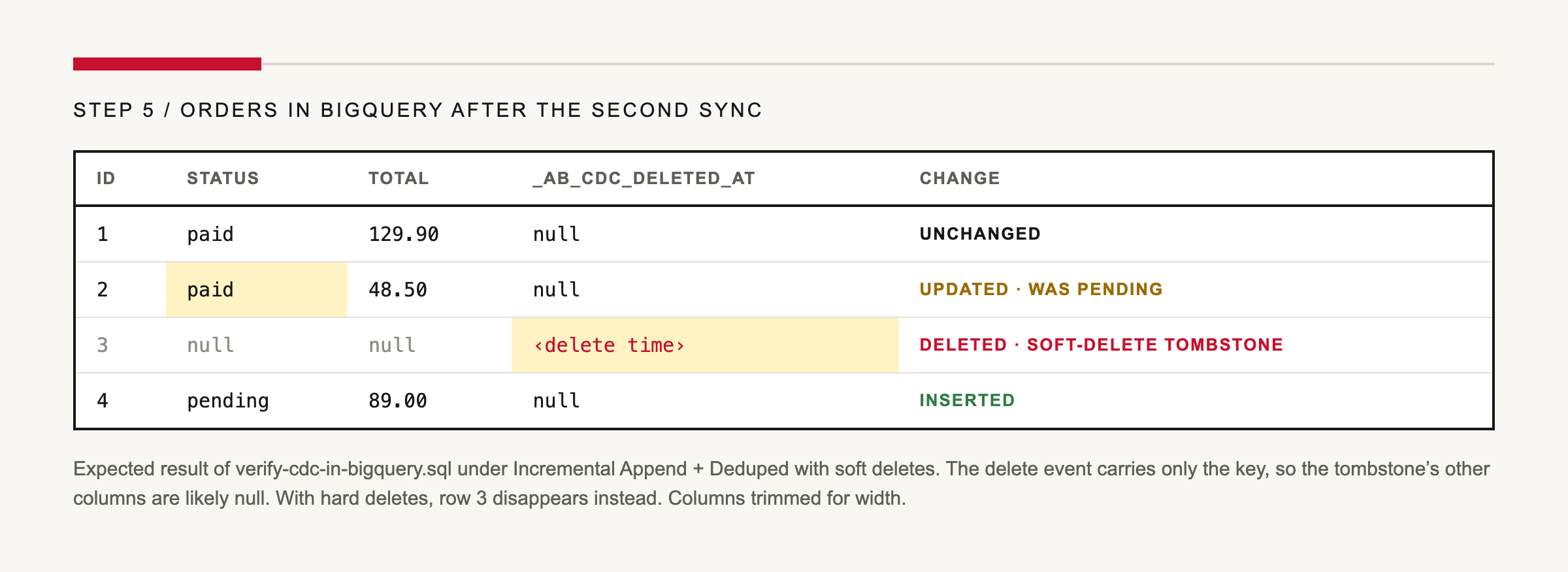
Run the connection again. With Incremental Append + Deduped, BigQuery should contain orders 1, 2, and 4. Order 2 should be paid; order 3 should either be absent under hard-delete mode or remain as a tombstone with _ab_cdc_deleted_at under the soft-delete mode selected above.
SELECT id, status, total, _ab_cdc_updated_at, _ab_cdc_deleted_at
FROM `YOUR_PROJECT.airbyte_demo.orders`
ORDER BY id;
That result is the reason to use CDC instead of a cursor on updated_at: the WAL contains the delete even though there is no source row left to query.
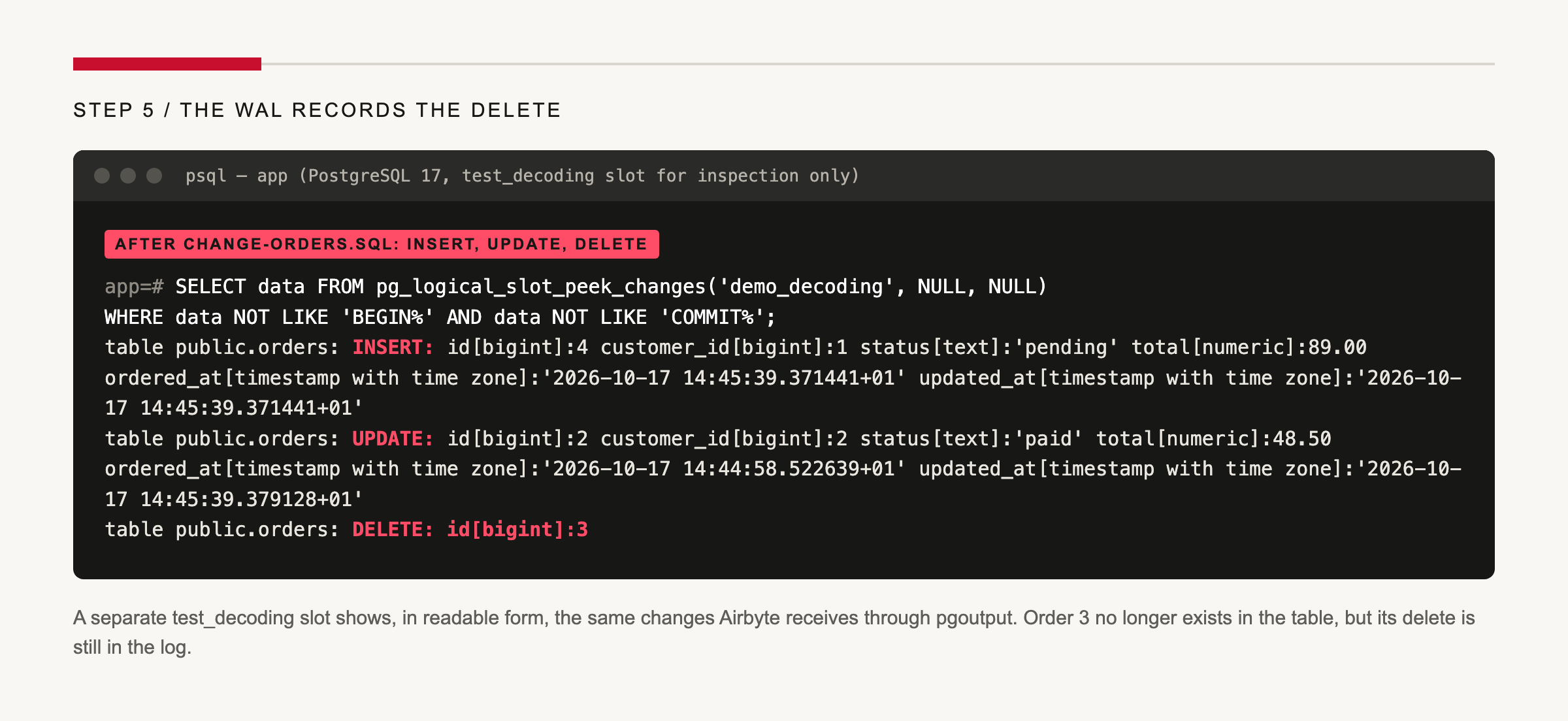
To see this yourself, create a second, temporary slot with the human-readable test_decoding plugin before running the changes, read it with pg_logical_slot_peek_changes, then drop it with pg_drop_replication_slot so it does not retain WAL. Never point Airbyte at this slot.
What breaks and how to recover
The connection test only proves that Airbyte can connect now. It does not prove that the slot will remain healthy, that every selected table is in the publication, or that every Postgres value has a lossless warehouse representation.
1. The slot retains WAL until disk pressure wins
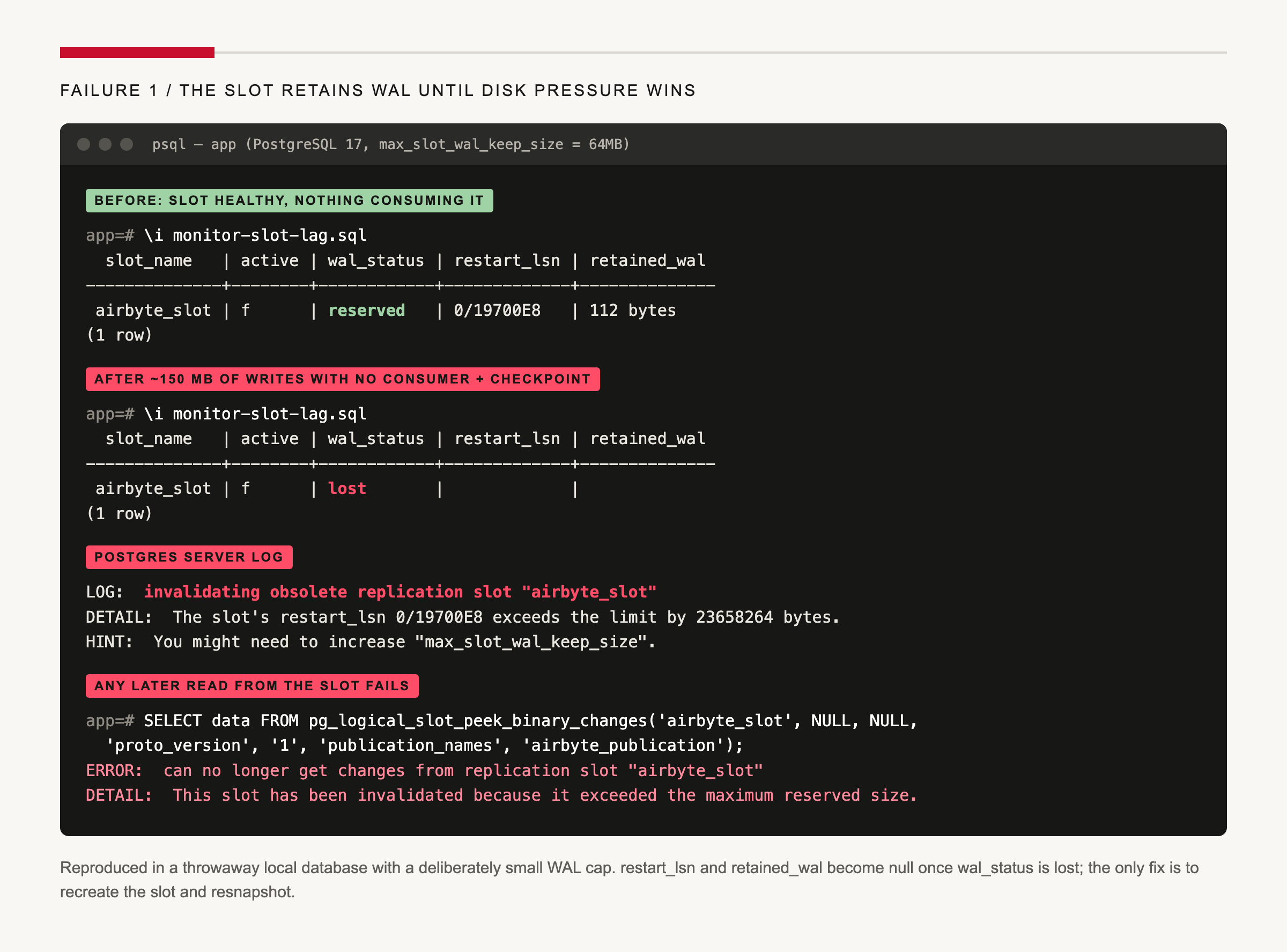
Symptom. Disk usage grows while the connection is paused or repeatedly failing. If retained WAL crosses max_slot_wal_keep_size, Postgres may invalidate the slot. pg_replication_slots then reports wal_status = 'lost' and restart_lsn becomes null. Airbyte fails the sync and cannot recover that slot automatically.
Why it happens. A logical slot promises that Postgres will retain WAL until its consumer acknowledges it. A stopped consumer therefore becomes a storage-retention mechanism.
Fix. Drop and recreate the slot, then reset or refresh the Airbyte connection so it takes a new full snapshot. Anything in the lost WAL range must be recovered from that snapshot; it cannot be replayed.
SELECT pg_drop_replication_slot('airbyte_slot');
SELECT pg_create_logical_replication_slot('airbyte_slot', 'pgoutput');
Prevent it. Alert on retained bytes and inactive slots:
SELECT
  slot_name,
  active,
  wal_status,
  restart_lsn,
  pg_wal_lsn_diff(pg_current_wal_lsn(), restart_lsn) AS retained_bytes,
  pg_size_pretty(
    pg_wal_lsn_diff(pg_current_wal_lsn(), restart_lsn)
  ) AS retained_wal
FROM pg_replication_slots
WHERE slot_type = 'logical';
Drop slots when their Airbyte source is permanently removed. Set max_slot_wal_keep_size deliberately, but remember: a larger cap buys recovery time by spending disk.
2. A selected table never arrives
Symptom. Airbyte discovers and lets you select a table, but CDC never delivers its changes.
Why it happens. Selection in the UI does not add a table to the Postgres publication. Airbyte’s connector documentation explicitly warns that a selected table outside the publication is not replicated.
Fix. Add it and refresh the source schema if necessary:
ALTER TABLE public.new_table REPLICA IDENTITY DEFAULT;
ALTER PUBLICATION airbyte_publication ADD TABLE public.new_table;
Then use Refresh source schema, approve the table, and run Refresh Stream so the new stream gets its initial snapshot.
Prevent it. Compare pg_publication_tables with the connection’s selected streams as part of every schema deployment.
3. The source reports “Discovered zero tables”
Symptom. The connection test succeeds at the network layer but discovery returns no usable streams. Current connector releases surface this as Discovered zero tables. with guidance about grants and filters.
Why it happens. The Airbyte role lacks USAGE on the schema or SELECT on its tables. A wrong database name, case-sensitive schema filter, or table filter can produce the same result.
Fix. Confirm the database and schema fields, then restore the grants:
GRANT USAGE ON SCHEMA public TO airbyte;
GRANT SELECT ON ALL TABLES IN SCHEMA public TO airbyte;
ALTER DEFAULT PRIVILEGES IN SCHEMA public
  GRANT SELECT ON TABLES TO airbyte;
Prevent it. Apply grants in the same migration that creates a schema or table, and run discovery in CI or a staging Airbyte instance after permission changes.
4. Valid Postgres values change silently
Symptom. A numeric value that is valid in Postgres becomes null in the destination, or a timestamp appears offset from what an analyst expected.
Why it happens. Airbyte documents that Infinity, -Infinity, and NaN in Postgres numeric, decimal, or floating-point columns are converted to null. It also maps timestamp without time zone to a timezone-free value and timestamptz to a timezone-aware value. BigQuery receives those as DATETIME and TIMESTAMP, respectively.
CREATE TABLE public.type_probe (
  id bigint PRIMARY KEY,
  measurement double precision,
  happened_local timestamp,
  happened_absolute timestamptz
);

INSERT INTO public.type_probe VALUES (
  1,
  'NaN',
  '2026-10-17 09:00:00',
  '2026-10-17 09:00:00+01'
);
Fix. Normalize non-finite values before ingestion or preserve their meaning in an explicit status column. Use timestamptz for instants that refer to one moment globally; reserve plain timestamp for deliberately timezone-free values such as a store’s opening time.
Prevent it. Add source-to-destination type fixtures and assertions. Row counts will not catch a value that became null.
5. A table has no primary key
Symptom. The first failure may not be in Airbyte at all. As soon as a table without a primary key joins the publication, Postgres rejects your application’s updates and deletes on it. On PostgreSQL 17:
ERROR:  cannot update table "events_no_pk" because it does not have a replica identity and publishes updates
HINT:  To enable updating the table, set REPLICA IDENTITY using ALTER TABLE.
ERROR:  cannot delete from table "events_no_pk" because it does not have a replica identity and publishes deletes
HINT:  To enable deleting from the table, set REPLICA IDENTITY using ALTER TABLE.
Inserts still succeed, which makes the problem easy to miss until a background job or admin action tries to change a row. On the Airbyte side, Incremental Append + Deduped needs a primary key, so the table cannot keep one current row per entity.
Why it happens. With REPLICA IDENTITY DEFAULT, Postgres identifies changed rows by primary key. Without one, it has nothing to write into the WAL for an update or delete, so it refuses the write rather than publish an incomplete change. Separately, Airbyte’s documentation says deduped mode requires a primary key and that incremental CDC is supported only for primary-keyed tables for most sources.
Fix. Add a genuine primary key. ALTER TABLE public.events_no_pk REPLICA IDENTITY FULL; unblocks the application’s writes immediately, but it only logs whole old rows; it does not give Airbyte a stable key for deduplication. If you cannot add a key, use Full Refresh for the table, choose append-only history and accept duplicates, or configure a separate non-CDC Postgres source with a reliable user-defined cursor.
Prevent it. Before running ALTER PUBLICATION … ADD TABLE, check that the table has a primary key or a deliberate replica identity. Treat a stable key as part of a table’s analytics contract, not a connector detail.
6. The schema changes while CDC is running
Symptom. A new column is absent in BigQuery, or a rename or type change surfaces as a schema-change notice or a failed sync instead of flowing through on its own.
Why it happens. CDC captures INSERT, UPDATE, and DELETE; it does not replicate ALTER statements themselves. Decoding the WAL on PostgreSQL 17 shows this directly: ALTER TABLE orders ADD COLUMN note text produces an empty transaction, and the new column first appears inside the next inserted row. Airbyte detects a changed source schema separately. Newly added columns need approval, selection, and an initial snapshot before CDC can track them safely.
Fix. Use Refresh source schema, review the change, approve the column, then choose Refresh Stream from the stream’s menu. For a rename or incompatible type change, treat the operation as a migration: pause the connection, change the source, refresh the schema, reset the affected stream if required, and validate both old and new warehouse columns before removing anything.
Prevent it. Set Detect and propagate schema changes to Approve all schema changes myself, which Airbyte recommends for CDC. The exact notices and failure modes vary between connector versions, so rehearse renames and type changes in staging with the same source and destination connector versions you use in production.
Production checklist
- Use a dedicated Postgres login and replication slot for each Airbyte source.
- Alert on slot inactivity,
wal_status, and retained WAL bytes. - Set
max_slot_wal_keep_sizefrom measured write volume and recovery time. - Keep the publication aligned with the selected Airbyte streams.
- Grant schema and table access through repeatable migrations.
- Schedule syncs frequently enough for the source’s write volume.
- Test non-finite numbers, timestamps, and other important type edges.
- Keep schema propagation on manual approval for CDC connections.
- Rehearse slot recreation and a full stream refresh before an incident.
When not to use this setup
For a tiny database copied once a day, a scheduled export or BigQuery federated query may be simpler than operating Airbyte and a replication slot. For sub-second delivery, Airbyte’s scheduled CDC is not a streaming system: each run reads from the previous log position up to the sync’s start time.
If you mainly need one narrow transformation and already operate a scheduler, a small, well-tested pipeline may be easier to own. I will compare that tradeoff directly in a future Airbyte vs. Fivetran vs. custom Python article.
What to do next
You now have the complete replication path: Postgres records changes in WAL, the slot preserves Airbyte’s position, the publication limits the stream, and Airbyte loads the result into BigQuery. More importantly, you have a recovery plan for the failures a green connection test does not reveal.
The next layer is transformation and orchestration: model the raw tables with dbt, then schedule and observe the wider workflow with Kestra. I will link that implementation here when it is published.
If your company needs a tested tutorial, migration guide, or documentation audit, see Work with me.
Sources and version notes
The Postgres behavior in this article (setup, slot checks, WAL decoding, slot invalidation, and the no-primary-key errors) was reproduced on PostgreSQL 17.11. The Airbyte and BigQuery steps were checked on October 17, 2026 against:
- Airbyte Postgres source documentation, connector 3.8.x
- Airbyte Open Source quickstart
- Airbyte BigQuery destination documentation, connector 3.2.x
- Airbyte CDC behavior and limitations
- Airbyte Incremental Append + Deduped
- BigQuery pricing and free usage
Airbyte changes UI labels and connector behavior frequently. Recheck those pages before publishing or retesting this tutorial.