AI developer tooling / Tutorial
Build Your First MCP Server in TypeScript (SDK v2) and Connect It to Claude, Cursor and Codex
Build a local Markdown search server with MCP TypeScript SDK v2, test it with Inspector, and connect it to Claude Desktop, Cursor, and Codex.
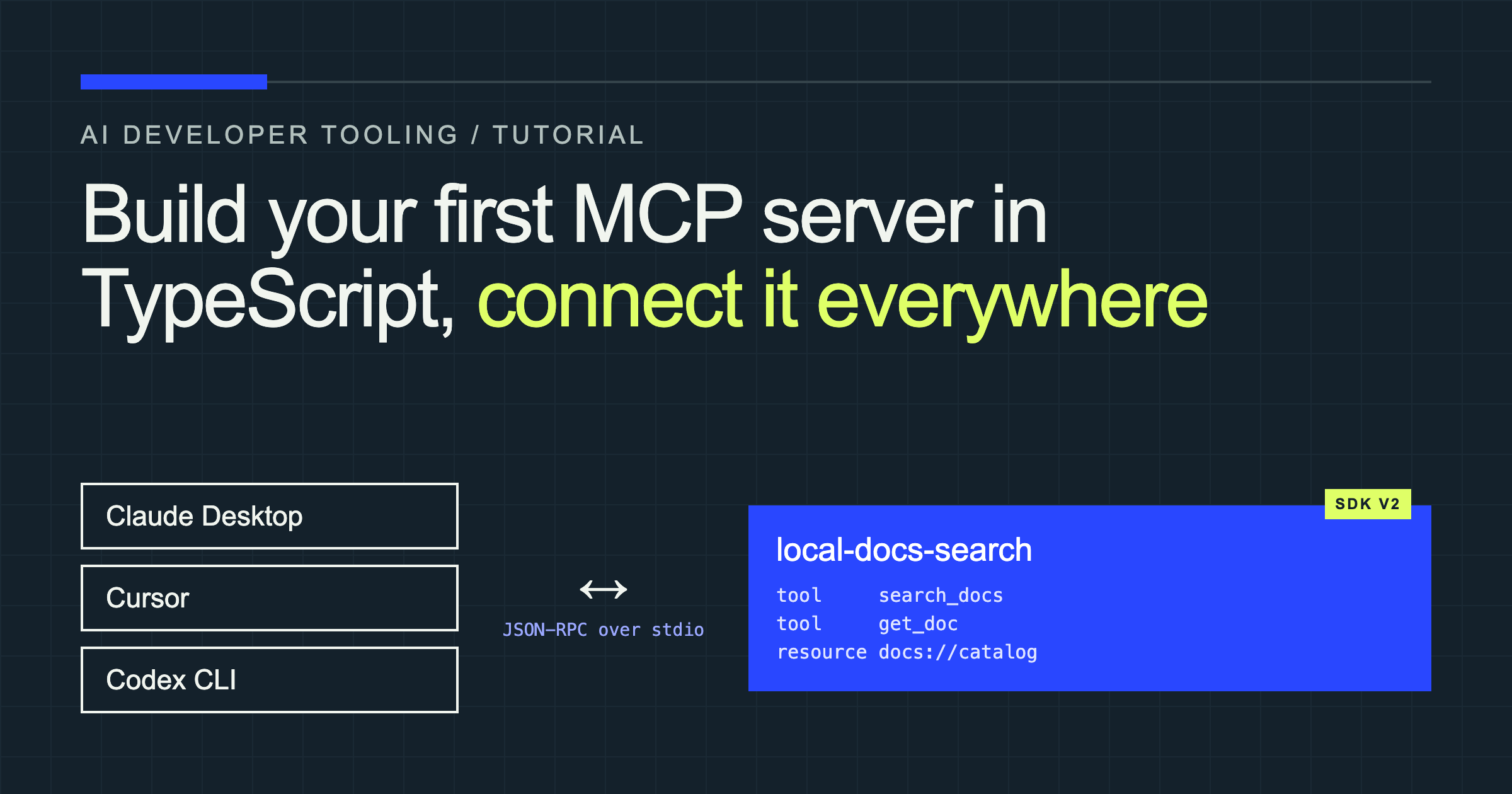
Build an integration for one AI client and you have an integration. Build an MCP server and every compatible client can use the same tools.
In this tutorial, you will build a local documentation-search server. It scans a folder of Markdown files, finds relevant sections, and lets an AI client read the complete document. There is no weather API, database, or API key to configure.
Then you will connect the same server to Claude Desktop, Cursor, and Codex. Along the way, we will fix six problems that make a working MCP server look broken: polluted stdout, missing executables, stale builds, invalid configuration, weak tool descriptions, and mixed module formats.
The code uses the stable v2 TypeScript SDK and the 2026-07-28 MCP specification—not the v1 package still shown in many tutorials.
MCP in 90 seconds
The Model Context Protocol is a standard connection between an AI application and external capabilities. The AI application is the client (or host). Your program is the server.
An MCP server can expose three main capability types:
- Tools are actions the model can call, such as searching documentation or creating an issue.
- Resources are data the client can read, such as a file, schema, or catalog.
- Prompts are reusable message templates for a workflow.
MCP supports local and remote connections. With stdio, the client starts your server as a child process and exchanges JSON-RPC messages over standard input and output. With Streamable HTTP, your server runs at a URL and can serve remote users. We will use stdio because the docs and all three clients are on one computer.
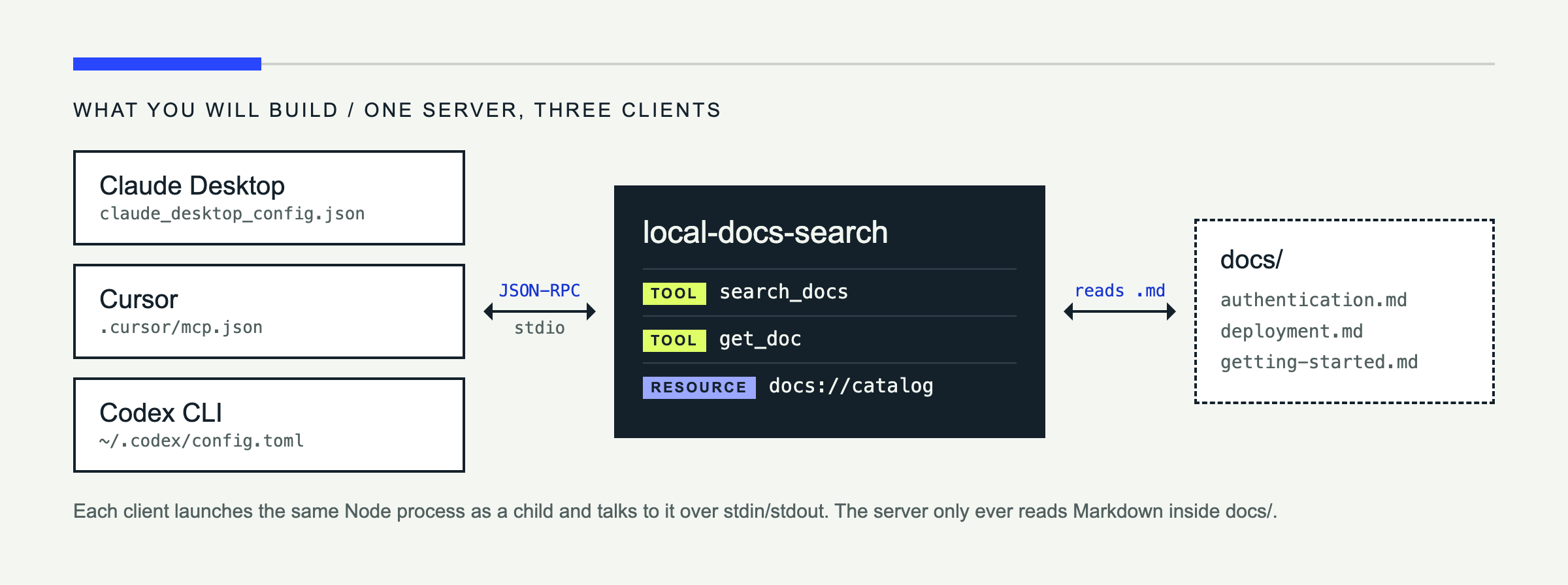
The official v2 SDK overview covers the protocol concepts and current package layout.
Prerequisites
You need:
- Node.js 22.19 or newer and basic TypeScript familiarity.
- At least one client: Claude Desktop, Cursor, or Codex CLI.
- Three or four Markdown files to search.
I compiled this example and called its tools on Node 22.14.0. The SDK itself supports Node 20+, but the current MCP Inspector requires Node 22.19+, so use that newer version for the complete walkthrough.
Step 1: Set up the project
Create a project and install the server SDK, Zod 4.2+, and TypeScript:
mkdir mcp-docs-search
cd mcp-docs-search
npm init -y
npm pkg set type=module
npm install @modelcontextprotocol/server "zod@^4.2"
npm install --save-dev typescript @types/node
npm pkg set scripts.build=tsc scripts.start="node dist/index.js"
mkdir -p src docsThose npm pkg set commands add "type": "module" and the build scripts without overwriting the dependency entries npm just created. The relevant part of package.json is:
{
  "name": "mcp-docs-search",
  "version": "1.0.0",
  "private": true,
  "type": "module",
  "scripts": {
    "build": "tsc",
    "start": "node dist/index.js"
  },
  "dependencies": {
    "@modelcontextprotocol/server": "^2.3.1",
    "zod": "^4.2.0"
  }
}
Create this TypeScript configuration:
{
  "compilerOptions": {
    "target": "ES2022",
    "module": "NodeNext",
    "moduleResolution": "NodeNext",
    "rootDir": "src",
    "outDir": "dist",
    "strict": true,
    "types": ["node"],
    "skipLibCheck": true
  },
  "include": ["src/**/*.ts"]
}
Your project will look like this:
mcp-docs-search/
├── docs/
│   ├── authentication.md
│   ├── deployment.md
│   └── getting-started.md
├── src/index.ts
├── package.json
└── tsconfig.json
Put any Markdown in docs/. Headings matter because the search tool returns the matching section, not just the filename.
Step 2: Write the server
Create src/index.ts. The complete file is below; then we will examine the important decisions.
import { readdir, readFile, realpath } from "node:fs/promises";
import { dirname, relative, resolve, sep } from "node:path";
import { fileURLToPath } from "node:url";
import { McpServer } from "@modelcontextprotocol/server";
import { serveStdio } from "@modelcontextprotocol/server/stdio";
import * as z from "zod/v4";

const projectRoot = resolve(dirname(fileURLToPath(import.meta.url)), "..");
const docsRoot = resolve(projectRoot, "docs");

async function safeDocPath(requestedPath: string): Promise<string> {
  const root = await realpath(docsRoot);
  const candidate = await realpath(resolve(root, requestedPath));

  if (!candidate.startsWith(`${root}${sep}`) || !candidate.endsWith(".md")) {
    throw new Error("Path must point to a Markdown file inside the docs folder.");
  }
  return candidate;
}

async function listDocs(directory = docsRoot): Promise<string[]> {
  const entries = await readdir(directory, { withFileTypes: true });
  const groups = await Promise.all(entries.map(async (entry) => {
    const fullPath = resolve(directory, entry.name);
    if (entry.isDirectory()) return listDocs(fullPath);
    return entry.isFile() && entry.name.endsWith(".md")
      ? [relative(docsRoot, fullPath)]
      : [];
  }));
  return groups.flat().sort();
}

function sections(markdown: string) {
  return markdown.split(/(?=^#{1,6}\s)/m).map((chunk) => {
    const [first = "", ...rest] = chunk.trim().split("\n");
    return {
      heading: first.replace(/^#{1,6}\s+/, "") || "Introduction",
      text: rest.join("\n").trim() || first,
    };
  });
}

function createServer(): McpServer {
  const server = new McpServer({
    name: "local-docs-search",
    version: "1.0.0",
  });

  server.registerTool(
    "search_docs",
    {
      description: "Search local Markdown documentation for a topic. Use this before answering questions about the project; returns paths, headings, and short matching excerpts.",
      inputSchema: z.object({
        query: z.string().min(2).describe("Words or phrase to find"),
        limit: z.number().int().min(1).max(10).default(5),
      }),
    },
    async ({ query, limit }) => {
      try {
        const terms = query.toLowerCase().split(/\s+/).filter(Boolean);
        const matches: Array<{
          path: string; heading: string; excerpt: string; score: number;
        }> = [];

        for (const path of await listDocs()) {
          const content = await readFile(await safeDocPath(path), "utf8");
          for (const section of sections(content)) {
            const text = `${section.heading}\n${section.text}`.toLowerCase();
            const score = terms.reduce(
              (total, term) => total + text.split(term).length - 1,
              0,
            );
            if (score > 0) matches.push({
              path,
              heading: section.heading,
              excerpt: section.text.replace(/\s+/g, " ").slice(0, 280),
              score,
            });
          }
        }

        const results = matches.sort((a, b) => b.score - a.score).slice(0, limit);
        return { content: [{
          type: "text",
          text: results.length
            ? JSON.stringify(results, null, 2)
            : `No documentation matched "${query}".`,
        }] };
      } catch (error) {
        return toolError("Search failed", error);
      }
    },
  );

  server.registerTool(
    "get_doc",
    {
      description: "Read one Markdown document returned by search_docs. The path must be relative to the docs folder.",
      inputSchema: z.object({
        path: z.string().min(1).describe("Path returned by search_docs"),
      }),
    },
    async ({ path }) => {
      try {
        const content = await readFile(await safeDocPath(path), "utf8");
        return { content: [{ type: "text", text: content }] };
      } catch (error) {
        return toolError("Could not read document", error);
      }
    },
  );

  server.registerResource(
    "docs-catalog",
    "docs://catalog",
    { title: "Documentation catalog", mimeType: "application/json" },
    async (uri) => ({ contents: [{
      uri: uri.href,
      mimeType: "application/json",
      text: JSON.stringify(await listDocs(), null, 2),
    }] }),
  );

  return server;
}

function toolError(prefix: string, error: unknown) {
  const detail = error instanceof Error ? error.message : String(error);
  return {
    content: [{ type: "text" as const, text: `${prefix}: ${detail}` }],
    isError: true,
  };
}

void serveStdio(createServer);
console.error("local-docs-search MCP server running on stdio");
registerTool gives the SDK a name, a description, a Zod input schema, and a handler. The schema becomes JSON Schema for the client and validates arguments before your code runs.
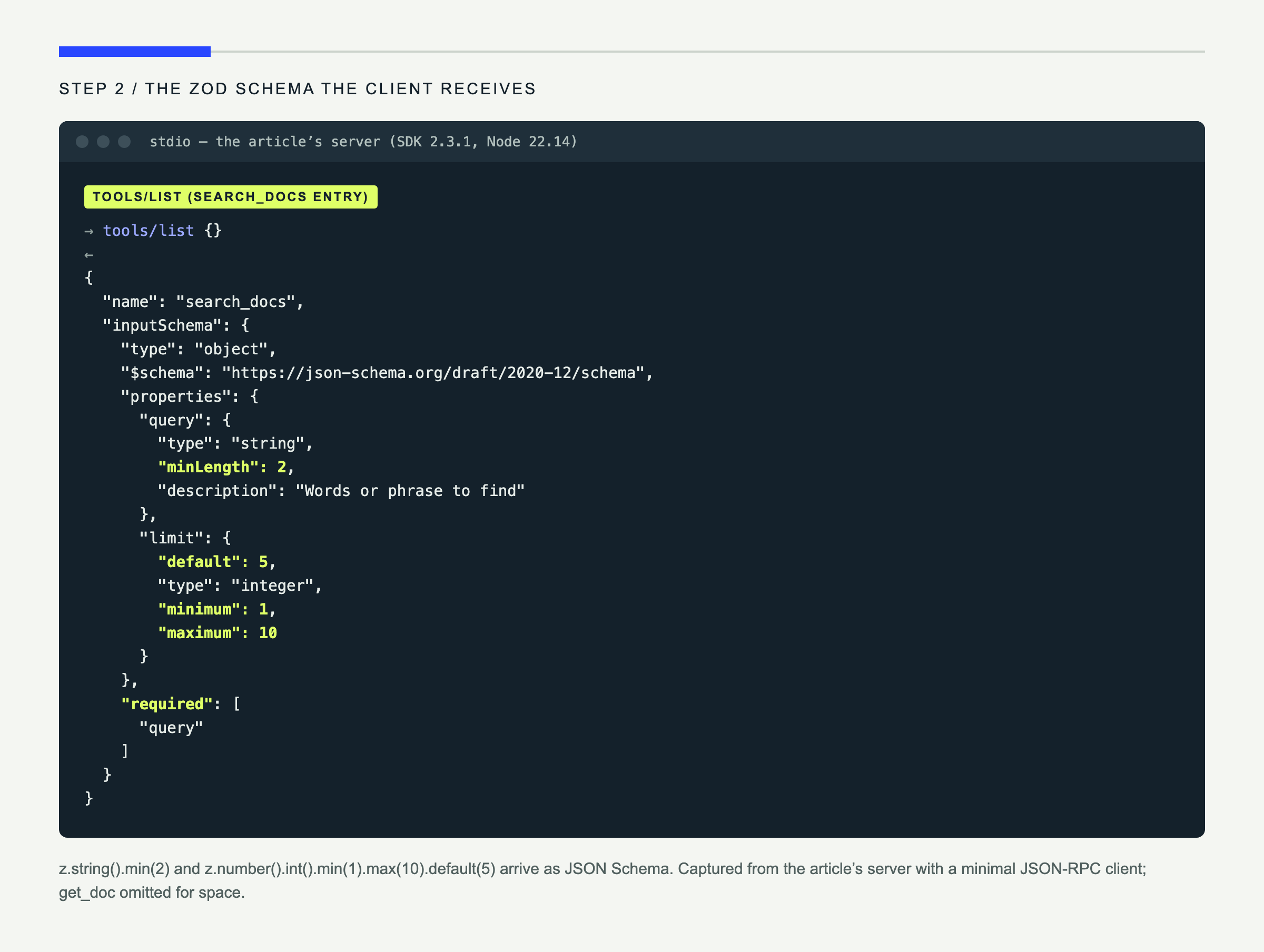
Descriptions are operational instructions for the model. “Search docs” is weak: it does not say what the tool searches or when to use it. The version above identifies the corpus, the result shape, and the intended moment in the workflow. That makes tool selection far more reliable.
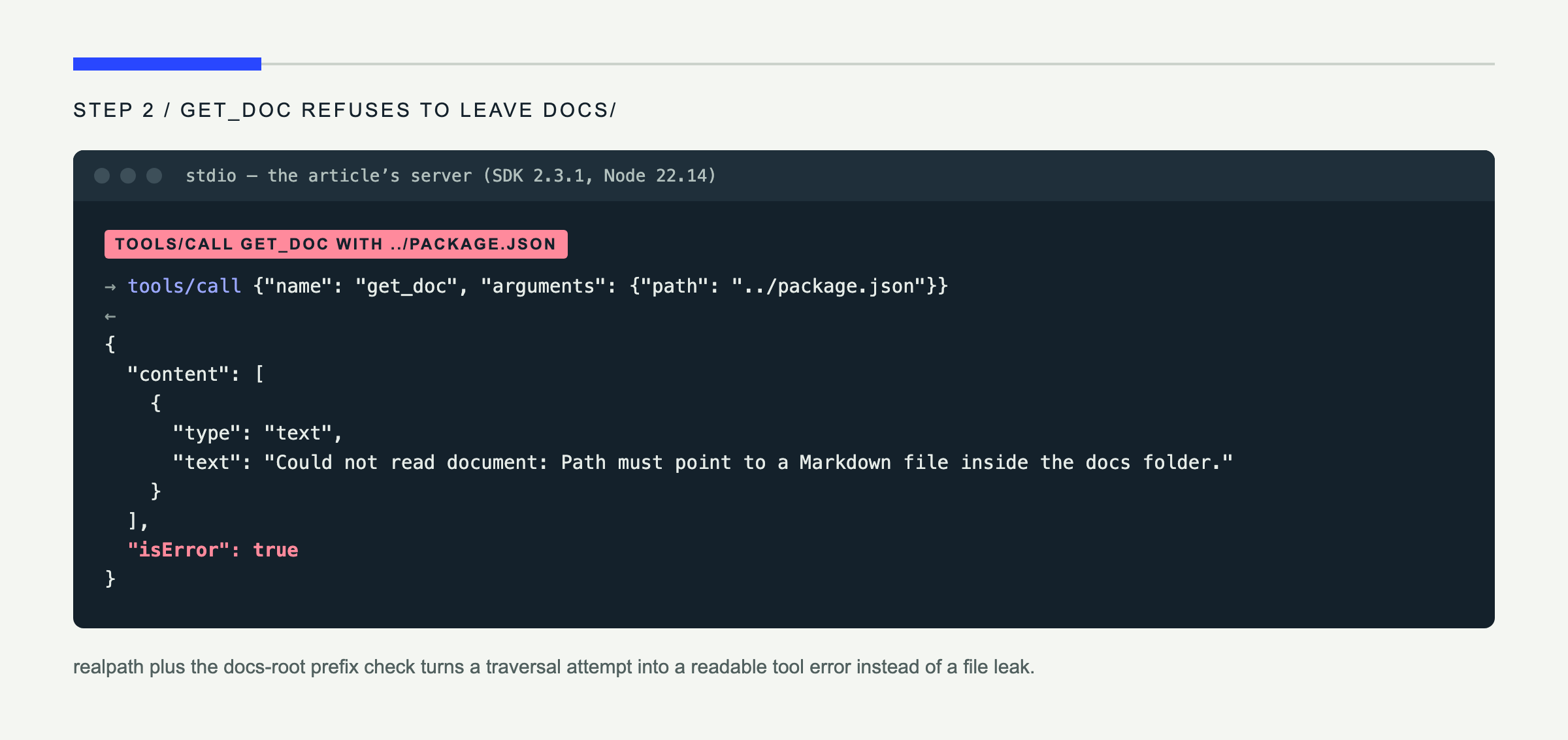
get_doc treats the model’s path as untrusted input. Calling resolve(docsRoot, path) alone is insufficient because ../ and symlinks can escape the folder. Resolving both paths with realpath, requiring the docs-root prefix, and accepting only .md files closes both routes. A tested ../package.json call returns isError: true instead of exposing the file.
The docs://catalog resource is deliberately small. It shows that resources are readable data while tools are model-invoked actions.
Finally, notice serveStdio(createServer). In v2, directly connecting new StdioServerTransport() still serves the older protocol era. The 2026-07-28 support guide says to use serveStdio to negotiate the modern revision while retaining compatible fallback behavior.
Build the server:
npm run buildStep 3: Test with MCP Inspector
Test the server before involving an AI client:
npx @modelcontextprotocol/inspector node dist/index.jsThe browser opens with a per-launch token. Click Connect, open Tools, select search_docs, and call it with:
{ "query": "authentication", "limit": 3 }You should receive paths, headings, excerpts, and scores. Open Resources to read docs://catalog.
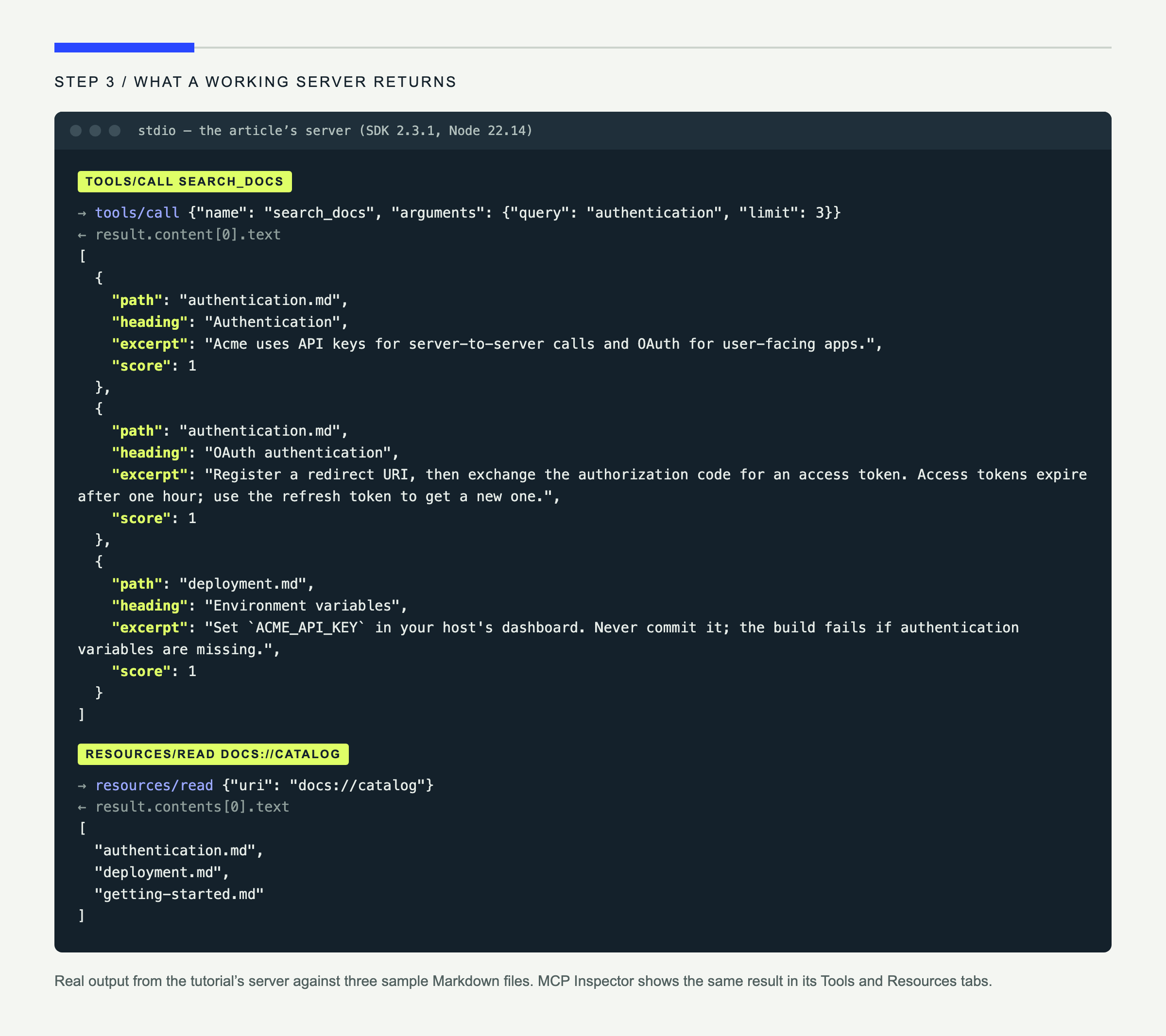
For a quick terminal check, use the Inspector’s CLI mode:
npx @modelcontextprotocol/inspector --cli node dist/index.js \
  --method tools/call \
  --tool-name search_docs \
  --tool-arg query=authentication \
  --tool-arg limit=3 \
  --format json
This step separates “the server is broken” from “the client configuration is broken.” Do not skip it.
Step 4: Connect Claude Desktop, Cursor, and Codex
Run which node on macOS/Linux or where node on Windows. Substitute that absolute executable path and your project’s absolute path in every example.
Claude Desktop
Claude Desktop’s JSON configuration is located at:
- macOS:
~/Library/Application Support/Claude/claude_desktop_config.json - Windows:
%APPDATA%\Claude\claude_desktop_config.json
Add the server without removing existing entries:
{
  "mcpServers": {
    "local-docs": {
      "command": "/absolute/path/to/node",
      "args": ["/absolute/path/to/mcp-docs-search/dist/index.js"]
    }
  }
}
Fully quit Claude Desktop and reopen it. Click the + beside the chat box, then Connectors, to see the server and its tools. Ask: “Search my local docs for authentication and summarize the relevant section.” Claude’s Developer settings show connection status and server logs; its macOS logs also live under ~/Library/Logs/Claude. The official MCP SDK’s real-host guide documents the config paths, restart behavior, and log locations.
Cursor
For a project-only server, create .cursor/mcp.json. For a global server, use ~/.cursor/mcp.json:
{
  "mcpServers": {
    "local-docs": {
      "command": "/absolute/path/to/node",
      "args": ["/absolute/path/to/mcp-docs-search/dist/index.js"]
    }
  }
}
Restart Cursor, or run Developer: Reload Window. Open Customize → MCPs, confirm the server is enabled, and use the same prompt in Agent chat. Cursor automatically offers relevant tools; you can toggle them from the chat tools list. For failures, open the Output panel and select MCP Logs. The current Cursor MCP documentation confirms both config locations.
Codex CLI
Codex uses TOML rather than JSON. Add this to ~/.codex/config.toml:
[mcp_servers.local_docs]
command = "/absolute/path/to/node"
args = ["/absolute/path/to/mcp-docs-search/dist/index.js"]
cwd = "/absolute/path/to/mcp-docs-search"
required = true
Start a new Codex session and verify discovery:
codex mcp list
codex "Search the local docs for authentication and cite the file you used."
You can also let the CLI write the entry:
codex mcp add local_docs -- /absolute/path/to/node \
  /absolute/path/to/mcp-docs-search/dist/index.js
Codex’s official configuration reference documents command, args, cwd, and required. For a debug run with a plaintext log, use RUST_LOG=debug codex -c log_dir=./.codex-log.
| Client | Configuration | Reload | Logs or status |
|---|---|---|---|
| Claude Desktop | claude_desktop_config.json (JSON) | Fully quit and reopen | Developer settings; Claude logs directory |
| Cursor | .cursor/mcp.json or ~/.cursor/mcp.json (JSON) | Reload Window or restart | Output → MCP Logs |
| Codex CLI | ~/.codex/config.toml (TOML) | Start a new session | codex mcp list; optional log_dir |
What breaks, and how to fix it
The server connects, then dies
Symptom: The client reports malformed JSON, a parse failure, or an abruptly closed connection.
Cause: Something wrote a log line to stdout. With stdio, stdout is the JSON-RPC channel; one console.log() can corrupt it.
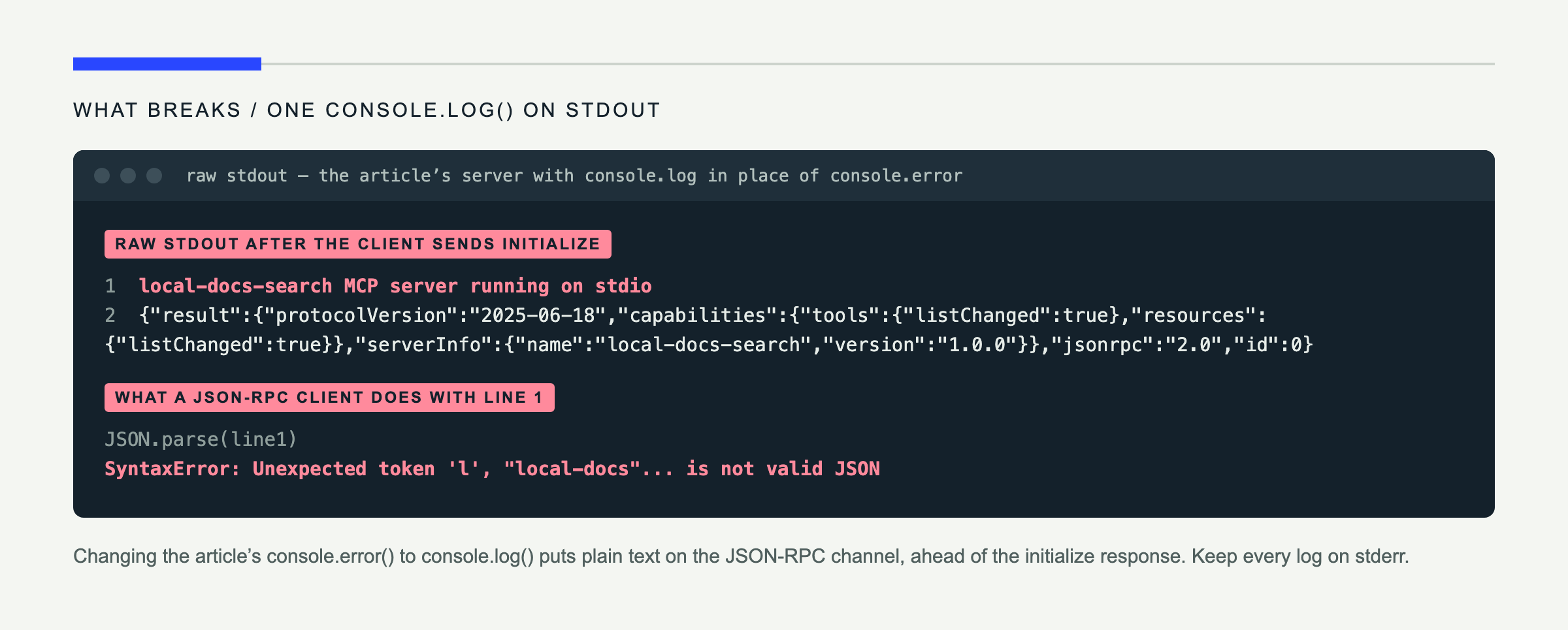
Fix: Use console.error() for diagnostics. The official v2 first-server guide makes the same warning.
The command is not found
Symptom: The server never starts; logs may include ENOENT or “command not found.”
Cause: Desktop apps do not necessarily inherit your interactive shell’s PATH. This is common when Node comes from nvm, fnm, or asdf.
Fix: Use absolute paths for both node and dist/index.js. Test the exact command from a fresh shell.
Your edit changes nothing
Symptom: The tool returns the old text after you edited src/index.ts.
Cause: The clients run dist/index.js, not your TypeScript source, or an existing child process is still alive.
Fix: Run npm run build, then fully reload the client. During development, add a version string to the stderr startup message so you can see which build launched.
The configuration silently fails
Symptom: The server is missing from the client’s tools list.
Cause: Typical culprits are a trailing comma in JSON, malformed TOML, or unescaped Windows backslashes. JSON requires C:\\Users\\you\\...; TOML supports literal single-quoted Windows paths.
Fix: Validate JSON with node -e 'JSON.parse(require("fs").readFileSync(process.argv[1]))' path/to/config.json. For Codex, run codex mcp list; for Cursor and Claude, open the log locations in the table above.
The model never calls the tool
Symptom: The server is connected, but the model answers from general knowledge.
Cause: A name such as search and a description such as “Search things” do not communicate the data source, result, or trigger.
Fix: Prefer search_docs and say: “Search local Markdown documentation for a topic. Use this before answering questions about the project; returns paths, headings, and excerpts.” Tool metadata is part of your product interface.
ESM and CommonJS collide
Symptom: Node throws ReferenceError: exports is not defined in ES module scope, or an import fails with ERR_PACKAGE_PATH_NOT_EXPORTED.
Cause: The compiler output and package.json module type disagree, or v1 import subpaths were copied into a v2 project.
Fix: Keep "type": "module", module: "NodeNext", and the v2 imports shown here. Rebuild after changing the configuration.
Going further: remote access and better search
Stdio is right when one local user owns both the client and the files. To share this server, expose it through Streamable HTTP. In v2, the Node transport lives in @modelcontextprotocol/node, while framework adapters are available for Express, Fastify, and Hono. The 2026-07-28 protocol is stateless at its core, which makes ordinary multi-instance HTTP deployment much easier than older session-oriented examples suggest.
Remote access changes the security model. Add OAuth, validate authorization for every tool, restrict the files each user can read, and use the SDK’s host-header protection for localhost services. Do not put this file reader on a public URL unchanged.
The current search ranks literal word matches. A useful next version could split Markdown into smaller chunks, add embeddings, and return semantic matches. That turns the same MCP surface into a small retrieval system without changing any client configuration.
The larger opportunity is to put an agent on top. An agent can call search_docs, inspect the best result with get_doc, and then take a follow-up action. In a future comparison, we will build that workflow with LangGraph, the OpenAI Agents SDK, and mcp-agent to see how their orchestration models differ.
Wrap-up
You built one TypeScript MCP server and made it available to three AI clients. The server exposes two tools and one resource, validates model input, blocks path traversal, reports readable errors, and negotiates the current 2026-07-28 protocol through SDK v2.
More importantly, you now know where integrations usually fail: stdout, executable paths, stale builds, configuration syntax, tool metadata, and module formats.
The complete server is included above; add your own Markdown files and connect the client you already use. If your team needs a tested tutorial or documentation like this, work with me.