Data engineering / Tutorial
Data Quality Gates with Great Expectations: Expectations, Checkpoints, and CI
Build a working data quality gate with Great Expectations: define an Expectation Suite, run it as a Checkpoint, store the results, and fail CI on bad data.
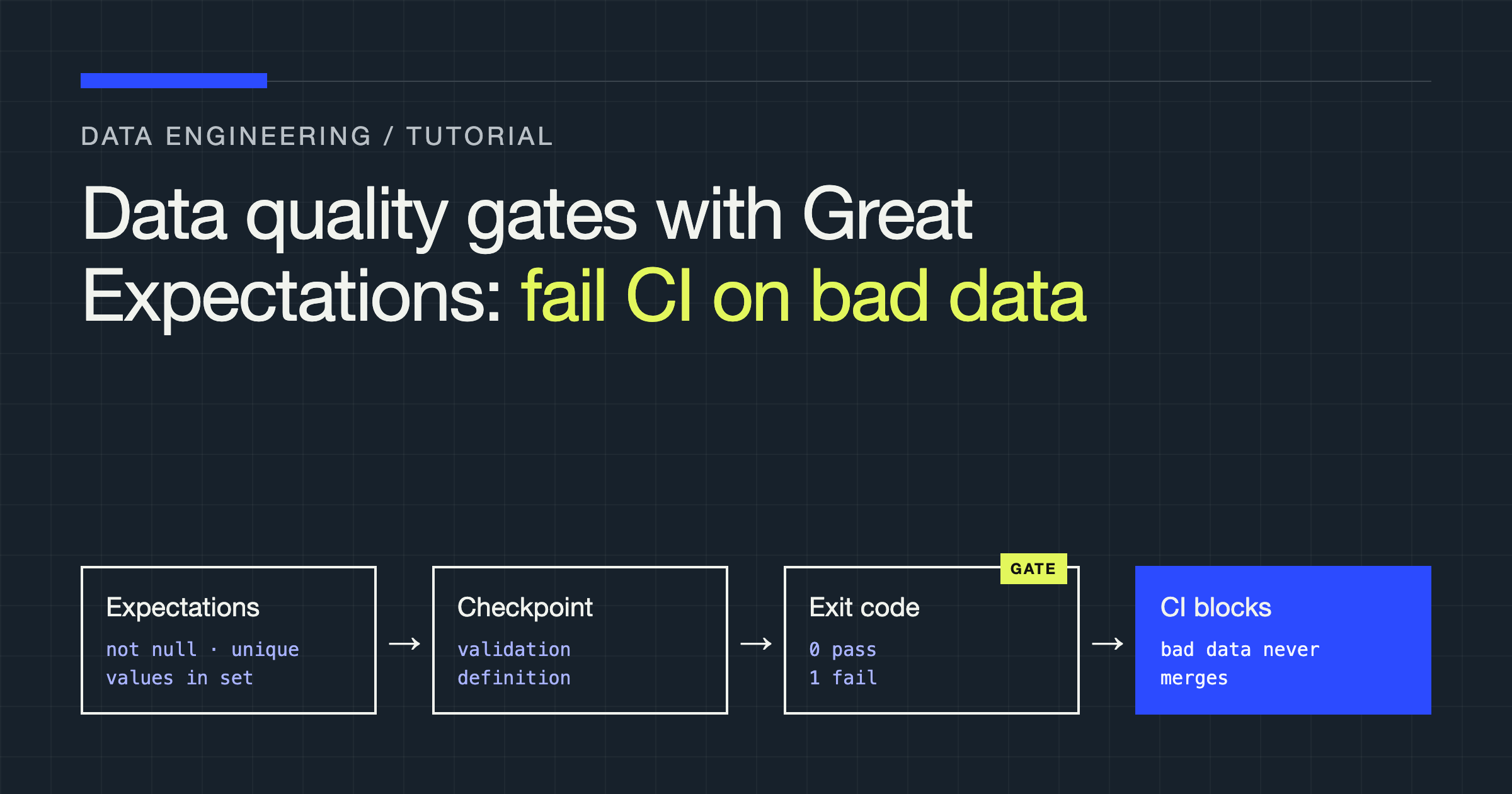
You will build a data quality gate that stops bad data from reaching the rest of your pipeline: a Great Expectations (GX) Data Context connected to an orders dataset, an Expectation Suite that states what valid orders look like, a Checkpoint that runs the suite and stores the results, and a small runner script that exits non-zero on failure so GitHub Actions fails the build. By the end, a renamed column, a null key, or an out-of-range amount will block a merge instead of surfacing downstream as a broken dashboard.
How a gate differs from a test you run once
A notebook validation proves your data was acceptable when you looked at it. A gate is the same validation, packaged so it runs unattended, in the same place, with the same verdict rule every time. GX gives you four pieces to assemble:
- A Data Context is the project object. It holds your configurations, stores, and registries, and it is what
gx.get_context()returns. - A Data Source, Data Asset, and Batch Definition describe where data lives and how to slice it into a Batch to validate.
- An Expectation Suite is an ordered collection of Expectations — verifiable assertions such as “this column is never null.”
- A Validation Definition binds a Batch Definition to a Suite. A Checkpoint groups one or more Validation Definitions, adds result formatting and follow-up Actions, and is the unit you run in production and in CI.
Most gate problems are really binding problems: the right suite running against the wrong batch, or the right batch checked by a suite nobody versioned.
Connect a data source
Install GX with pandas support and create a file-backed context. The file mode persists suites, validation definitions, and checkpoints under a gx/ folder you commit to version control, which is exactly what a gate needs: the contract travels with the code that produces the data.
pip install "great_expectations[pandas]"import great_expectations as gx
context = gx.get_context(mode="file")
data_source = context.data_sources.add_pandas(name="orders_pandas")
data_asset = data_source.add_dataframe_asset(name="orders")
batch_definition = data_asset.add_batch_definition_whole_dataframe(
name="orders_whole_dataframe"
)A dataframe asset is the right starting point when your pipeline hands GX an in-memory frame — after a read, an extract, or a transform. If your data already sits in files, a warehouse, or a lake, you swap only this layer: context.data_sources.add_pandas_filesystem(...) with a CSV asset for a landing zone, add_spark(...) for Spark frames, or a SQL data source with a table asset for a warehouse table. The suite, validation definition, and checkpoint below do not change, because they talk to the Batch Definition, not to the storage engine.
Batch definitions control granularity. A whole-dataframe definition validates everything you pass in as one batch. File and table assets offer partitioned definitions — daily, monthly, yearly, or whole-table variants — so you can validate one partition per run instead of rescanning history. Choose the smallest batch that still represents one delivery: one file, one partition, one load. If a failure cannot tell you which delivery broke, your batch is too big.
Write the Expectation Suite
Write expectations from the contract of the dataset, not from whatever the data happens to look like today. For an orders feed, that contract usually covers shape, keys, ranges, and formats:
import great_expectations.expectations as gxe

suite = gx.ExpectationSuite(name="orders_suite")

suite.add_expectation(
    gxe.ExpectTableColumnsToMatchSet(
        column_set=[
            "order_id",
            "customer_id",
            "status",
            "currency",
            "total_amount",
            "ordered_at",
        ],
        exact_match=False,
    )
)
suite.add_expectation(
    gxe.ExpectTableRowCountToBeBetween(min_value=1, max_value=100_000)
)
suite.add_expectation(
    gxe.ExpectColumnValuesToNotBeNull(column="order_id")
)
suite.add_expectation(
    gxe.ExpectColumnValuesToBeUnique(column="order_id")
)
suite.add_expectation(
    gxe.ExpectColumnValuesToNotBeNull(column="customer_id", mostly=0.99)
)
suite.add_expectation(
    gxe.ExpectColumnValuesToBeBetween(
        column="total_amount", min_value=0, max_value=10_000
    )
)
suite.add_expectation(
    gxe.ExpectColumnValuesToMatchRegex(
        column="currency", regex=r"^[A-Z]{3}$"
    )
)
suite.add_expectation(
    gxe.ExpectColumnValuesToBeInSet(
        column="status",
        value_set=["placed", "paid", "shipped", "cancelled"],
    )
)

context.suites.add(suite)
The bounds and value sets above are illustrative: replace them with the limits your own feed promises. Three habits keep a suite trustworthy. First, pin the schema explicitly — without it, a renamed or dropped column can pass silently because every surviving column still looks fine. Second, protect keys before ranges: a null or duplicated order_id corrupts joins in ways a slightly odd amount never will. Third, keep each expectation about one property, so a failure names a single broken promise.
Expectations operate at different levels, and the level determines both what you catch and what a failure can tell you:
| Expectation type | Examples | What it catches well | Limitation |
|---|---|---|---|
| Table-level | ExpectTableRowCountToBeBetween, ExpectTableColumnsToMatchSet | Empty loads, truncated files, schema drift | Cannot locate the offending rows |
| Column aggregate | ExpectColumnMeanToBeBetween, ExpectColumnDistinctValuesToBeInSet | Distribution shift, a source quietly changing units or codes | Averages hide a small number of very bad rows |
| Column values | ExpectColumnValuesToNotBeNull, ExpectColumnValuesToBeBetween, ExpectColumnValuesToMatchRegex | Row-level defects you can count, list, and quarantine | Costs a scan of the column on every run |
| Multi-column | ExpectColumnPairValuesToBeEqual, ExpectSelectColumnsToBeUniqueWithinRecord | Broken relationships inside a row, such as mismatched totals | Harder to write, and failures are harder to explain |
Bind the suite with a Validation Definition and a Checkpoint
A suite on its own validates nothing. Bind it to the batch definition, then wrap the binding in a checkpoint with the actions you want taken on every run:
from great_expectations.checkpoint import (
    StoreCheckpointResultAction,
    StoreValidationResultAction,
    UpdateDataDocsAction,
)

validation_definition = gx.ValidationDefinition(
    name="orders_validation",
    data=batch_definition,
    suite=suite,
)
context.validation_definitions.add(validation_definition)

checkpoint = gx.Checkpoint(
    name="orders_gate",
    validation_definitions=[validation_definition],
    actions=[
        StoreValidationResultAction(name="store_validation_result"),
        StoreCheckpointResultAction(name="store_checkpoint_result"),
        UpdateDataDocsAction(name="update_data_docs"),
    ],
    result_format={"result_format": "COMPLETE"},
)
context.checkpoints.add(checkpoint)
The actions are the difference between a check and a gate with a memory. StoreValidationResultAction persists each validation result, StoreCheckpointResultAction persists the checkpoint-level outcome, and UpdateDataDocsAction rebuilds Data Docs — the static site GX generates from your suites and results, where you can read exactly which expectations failed and inspect the unexpected values behind them. Notification actions follow the same pattern: add a Slack or email action configured to fire on failure, and the gate pages the owner instead of failing quietly in a log nobody opens.
Result format controls how much evidence a run returns. SUMMARY and BASIC keep results light, which suits high-frequency checks. COMPLETE also returns the unexpected rows and values, which you want when a human or a quarantine step has to act on a failure. Pay for COMPLETE on blocking gates; use a lighter format for monitoring-only validations.
Run the gate as a script with a real exit code
CI systems understand exit codes, not intentions. Your runner loads the persisted checkpoint, validates the delivery in front of it, and translates the verdict into a process exit status:
import sys

import great_expectations as gx
import pandas as pd


def main() -> int:
    context = gx.get_context(mode="file")
    checkpoint = context.checkpoints.get("orders_gate")

    dataframe = pd.read_csv("data/landing/orders.csv")
    result = checkpoint.run(
        batch_parameters={"dataframe": dataframe}
    )

    print(result.describe())
    if not result.success:
        print("Data quality gate failed: orders were not promoted.")
        return 1
    return 0


if __name__ == "__main__":
    sys.exit(main())
Notice what the runner does not do: it does not catch the failure and continue, and it does not promote the data before validating it. Validate the staging or landing copy, promote only on success, and let the non-zero exit do its work. If reading the file itself raises, the script also exits non-zero — an unhandled exception is a failed gate, which is the safe direction to fail.
Wire the gate into CI
With the runner in place, the GitHub Actions wiring is deliberately boring:
name: data-quality

on:
  pull_request:
  push:
    branches: [main]

jobs:
  orders-gate:
    runs-on: ubuntu-latest
    steps:
      - uses: actions/checkout@v4
      - uses: actions/setup-python@v5
        with:
          python-version: "3.12"
          cache: pip
      - name: Install validation dependencies
        run: pip install -r requirements-quality.txt
      - name: Run the orders data quality gate
        run: python quality/run_gate.py
      - name: Keep Data Docs from the run
        if: always()
        uses: actions/upload-artifact@v4
        with:
          name: data-docs
          path: gx/uncommitted/data_docs/
Two details matter here. First, there is no continue-on-error on the gate step: the runner returns 1, the step fails, the job fails, and the pull request shows a failing check that branch protection can require. The moment someone softens that for convenience, you no longer have a gate — you have a report. Second, the artifact step runs if: always(), so the Data Docs from a failed run are uploaded as build artifacts. Reviewers should be able to open the evidence from the failed check instead of re-running anything locally.
Run the same checkpoint in CI and again in your orchestrator when the pipeline executes. CI validates the data your fixture represents; the production run validates the delivery that actually arrived. One shared definition keeps those two verdicts comparable.
Failure modes and trade-offs
mostly and evaluation parameters. Most column-value expectations accept mostly, the minimum proportion of values that must satisfy the expectation for it to succeed. Used deliberately, it absorbs a known, bounded imperfection — an optional field a source occasionally omits — without weakening a hard rule elsewhere. Used carelessly, it hides a growing defect behind a threshold nobody revisits. Keep mostly off keys and amounts, and when you set it, treat the threshold as part of the contract that gets reviewed like code. Relatedly, avoid hard-coding every threshold deep inside a suite: values you expect to tune, such as row-count bounds for a growing feed, belong where a reviewer can see and change them without editing expectation logic.
Row-level versus aggregate checks. Row-level expectations find the defect; aggregate expectations find the drift. A mean that moves, a distinct-value set that gains a member, or a row count that steps outside its band often signals an upstream change that no single row violates. Run both kinds, but page on them differently if you can: row-level failures usually mean bad records, aggregate failures usually mean something upstream changed and deserves a conversation before it deserves a block.
Sampling versus full scans. Validating a sample is cheaper, and it will eventually miss the rare defect that matters — the rows you did not inspect cannot fail. Gate on full scans for data you promote, and reserve sampling for large, append-only monitoring where the goal is spotting trends rather than certifying a delivery. If a full scan is too slow, shrink the batch by partitioning rather than sampling inside an ever-larger batch.
Schema drift. Sources rename, retype, and drop columns without asking. Your column-set expectation catches removals and renames, but only if you wrote it before the drift and resisted setting it so loosely that nothing can fail it. When drift is legitimate, update the suite in the same change as the source change, and let the failing gate be the reminder that forces the two to move together.
Noisy gates. A gate that fails on data the business accepts trains everyone to bypass it. Fight noise by tiering: a small blocking suite of promises you are willing to defend at an awkward hour, and a separate non-blocking checkpoint for softer expectations whose results you review as monitoring. Promote an expectation into the blocking suite only after it has run clean as monitoring or you are certain the contract is real.
Quarantining versus failing fast. Failing fast is correct when consumers cannot safely use a partial delivery, or when bad rows would merge into state that is hard to unwind. Quarantining — routing unexpected rows aside and promoting the rest — is correct when rows are independent, the valid majority has time-sensitive value, and someone owns reviewing the quarantine. COMPLETE results identify the unexpected values, but the routing itself is your pipeline code. Never quarantine silently: a quarantined batch is still a failed contract, and it should still notify and expire if nobody claims it.
Test the suite itself
A suite you have never seen fail is a hypothesis, not a gate. Cover it with tests that feed it deliberately good and deliberately broken frames through an ephemeral context, which keeps all configuration in memory and leaves no files behind:
import pandas as pd
import great_expectations as gx
import great_expectations.expectations as gxe


def run_suite(dataframe: pd.DataFrame) -> bool:
    context = gx.get_context(mode="ephemeral")
    source = context.data_sources.add_pandas(name="test_pandas")
    asset = source.add_dataframe_asset(name="orders")
    batch_definition = asset.add_batch_definition_whole_dataframe(
        name="whole_dataframe"
    )
    suite = gx.ExpectationSuite(name="orders_suite")
    suite.add_expectation(
        gxe.ExpectColumnValuesToNotBeNull(column="order_id")
    )
    suite.add_expectation(
        gxe.ExpectColumnValuesToBeBetween(
            column="total_amount", min_value=0, max_value=10_000
        )
    )
    validation = gx.ValidationDefinition(
        name="test_validation", data=batch_definition, suite=suite
    )
    result = validation.run(batch_parameters={"dataframe": dataframe})
    return result.success


def test_valid_orders_pass() -> None:
    frame = pd.DataFrame(
        {"order_id": [1, 2], "total_amount": [25.0, 40.0]}
    )
    assert run_suite(frame) is True


def test_null_order_id_fails() -> None:
    frame = pd.DataFrame(
        {"order_id": [1, None], "total_amount": [25.0, 40.0]}
    )
    assert run_suite(frame) is False
The sample frames here are illustrative test fixtures, deliberately tiny. Mirror this pattern for your real suite: one passing frame, then one targeted failure per critical expectation. These tests catch the embarrassing failure mode — a suite edited until it passes everything, including data it exists to reject.
Verdict
Use a GX checkpoint as the gate for any dataset whose consumers trust it without inspecting it — which, in practice, means any dataset with a dashboard, a model, or another pipeline downstream. Start narrow: pin the schema, protect the keys, bound the amounts, and check the row count. Persist every result, publish Data Docs from the run, and make the runner exit non-zero so CI and your orchestrator enforce the same verdict. Keep softer expectations in a non-blocking checkpoint until they earn promotion, and test the suite against broken data so you know it can fail. Do that, and “data quality” stops being a hope attached to a pipeline and becomes a contract the pipeline has to satisfy before anything moves.