Documentation & DX / Docs teardown
Paystack vs Flutterwave vs Stripe: Whose API Docs Give You the Clearest Path to a First Payment?
A documentation teardown of Paystack, Flutterwave v4, and Stripe for Nigerian developers—from test keys to server verification and a working webhook.
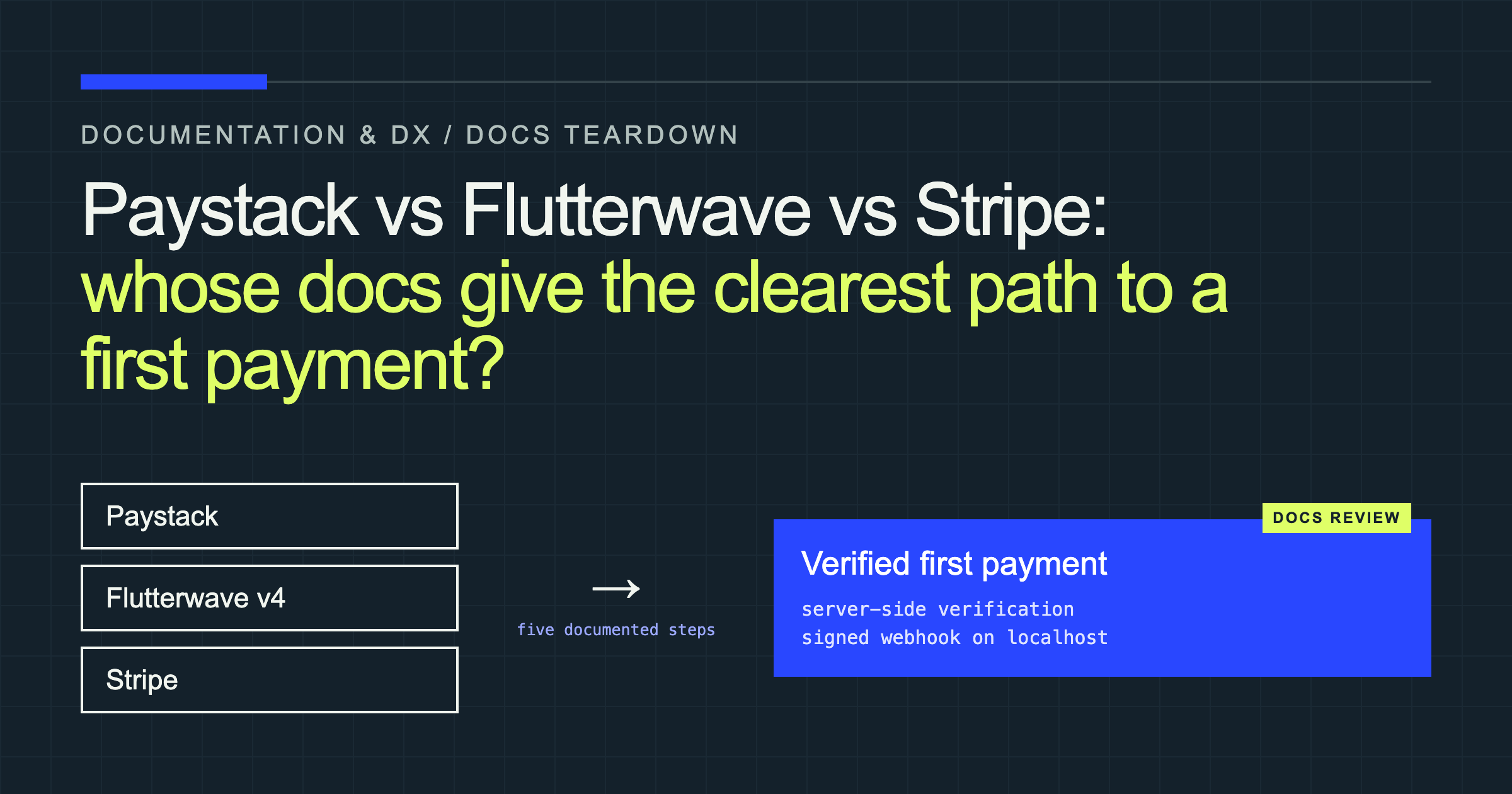
A developer’s first hour with a payments API is part integration test, part product demo. If the quickstart makes the happy path obvious, the API feels dependable. If it leaves the developer choosing between two API versions or guessing whether a redirect means “paid,” confidence disappears before a real transaction ever happens.
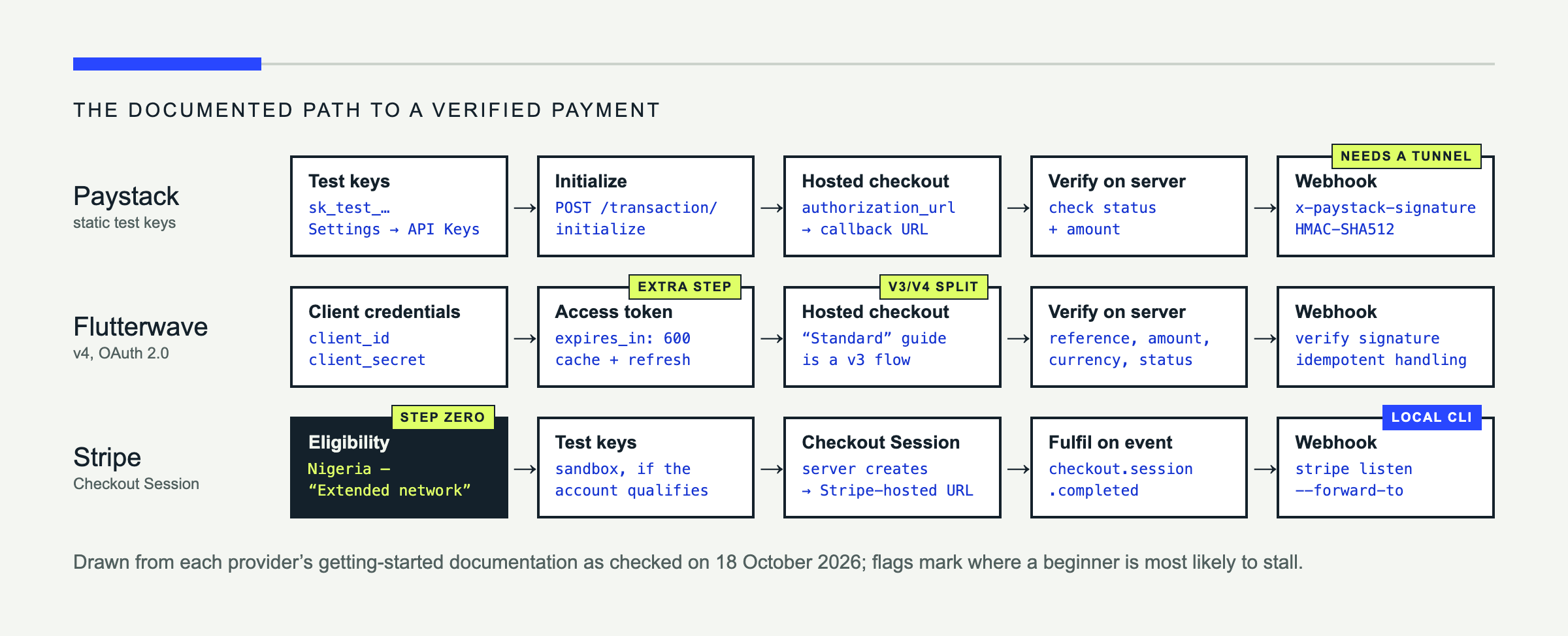
This teardown gives Paystack, Flutterwave, and Stripe the same job on paper: take a hosted test payment, verify it on a Node.js server, and receive a valid webhook. For each provider, it follows the path the official getting-started documentation lays out—from test credentials to a server-confirmed payment—and asks three questions at every step: what the docs tell you to do, what they leave you to work out, and where a beginner is most likely to stall.
The short version: Paystack documents the most direct path to a server-verified payment. Flutterwave v4 documents a sound but longer path, and lets readers drift into v3 without warning. Stripe has the best local webhook tooling of the three, but for a Nigerian developer its documentation leaves the most important question—can I get this account at all?—unanswered until after signup.
The rules of the review
“First payment” can mean almost anything. A checkout page opening is not a successful integration, and neither is landing on a ?status=success URL. For this review, a provider’s documentation had to carry a developer through the same sequence:
- Create a test account and obtain sandbox credentials.
- Initialize a hosted checkout from a Node.js server.
- Pay with the provider’s test details.
- Return to the application and verify the transaction from the server.
- Receive a signed webhook locally and validate its origin.
At each step, the review looks at whether the docs say what to do next, whether the security-critical rule (never trust the redirect) appears where a beginner will see it, and whether any step silently assumes knowledge the reader may not have. The perspective is a developer based in Nigeria, which matters for account eligibility.
The scorecard
| Paystack | Flutterwave v4 | Stripe | |
|---|---|---|---|
| Credentials | Static sk_test_ key from the dashboard | OAuth client credentials, then a short-lived access token | Test keys, subject to account eligibility |
| Calls before the first payment request | None | One token exchange | None, once the account qualifies |
| “Verify on the server” guidance | In the main payment guide | In the main payment flow, with the most explicit checklist | In Checkout fulfillment guidance |
| Local webhook testing | Says localhost won’t work; no first-party forwarding tool | Strong verification guidance; no first-party forwarding tool | First-party CLI forwards events to localhost |
| Version clarity | One coherent path | Hosted-checkout guide crosses into v3 | One coherent path |
| Biggest stall point | Exposing a local webhook | Choosing between v3 and v4 | Nigerian account eligibility |
Paystack: one coherent payment path
Signup and test keys
Paystack’s support documentation says a new business account is created immediately from a business name, full name, email, country, and password, then opens in Test Mode. The API keys guide points to Settings → API Keys & Webhooks, while the API authentication page explains the pk_test_ and sk_test_ prefixes and makes the public-key/secret-key boundary explicit.
That is the shortest documented route to a working credential of the three: no token exchange, no eligibility question, one key that goes straight into an Authorization header.
From initialization to verification
The strongest part of Paystack’s quickstart is that it presents payment as a server-owned sequence. The Accept Payments guide starts with POST /transaction/initialize, returns an authorization_url, and then sends the customer back to a callback URL. More importantly, it does not treat that callback as proof of payment. It tells the developer to call the verification endpoint and compare both the returned status and amount with the order stored on the server.
That security advice appears where a beginner needs it, not in an advanced guide. It prevents a common bug: fulfilling an order because the customer reached a success-looking URL they can manipulate.
Paystack also lists a server-side Node package, PaystackOSS/paystack-node, under Developer Tools, alongside an OpenAPI description, Postman collection, CLI, and MCP server. The core payment guide does not lead to that SDK, though, so a developer following the quickstart will write plain HTTP calls. An SDK only shortens time-to-first-payment if the quickstart points to it and its examples match the current API.
Webhooks
Paystack’s webhook guide is unusually direct about operational behavior. It shows HMAC-SHA512 verification through the x-paystack-signature header, requires a fast 200 OK, documents retry timing, and states that localhost cannot receive events. What it does not provide on that page is a first-party local forwarding command. A beginner must already know to expose their server through a tunnel or discover another testing tool.
What Paystack does well: it keeps initialization, redirect, verification, and webhook security conceptually aligned. The docs repeatedly insist that the server verify status and amount before delivering value.
The fix I would make: add a five-command “test a webhook on localhost” box to the main payment quickstart, including a tunnel example, the raw-body requirement, and a sample successful event. That would close the only part of the happy path that currently assumes prior webhook experience.
Flutterwave: capable v4 docs with a version boundary in the path
OAuth changes the starting line
Flutterwave v4 replaces v3’s long-lived bearer key flow with OAuth 2.0 client credentials. The v4 authentication guide has the exact token request and shows expires_in: 600, so the access token in its example lasts ten minutes. That is a sound production model, but it adds a step before the first business API call: obtain the token, cache it, and refresh it before expiry.
The v4 integration journey says a free developer account immediately provides sandbox access and reserves KYC for production, so the extra work is technical, not bureaucratic.
The v3/v4 split is visible from the happy path
This is the documentation finding I would address first. Flutterwave keeps both versions live. The v4 Environments page uses https://developersandbox-api.flutterwave.com and OAuth tokens. The current v3 authentication page uses static FLW_SECRET_KEY credentials and https://api.flutterwave.com/v3.
Yet the v4 integration journey recommends “Flutterwave Standard” for hosted checkout, while the linked Flutterwave Standard guide is a v3 flow using a static secret key and returning a /v3/hosted/pay/ URL. A developer who starts in v4 can cross into v3 without a prominent migration decision.
That is not merely aesthetic inconsistency. It changes the credential type, base URL, response shapes, SDK assumptions, and what “current” sample code means. A beginner who copies the Standard example into a v4 project will be mixing two authentication models—and the docs never tell them they did.
Errors, verification, and webhooks
Once inside v4, the error model is good. The v4 errors reference returns an HTTP status plus error.type, error.code, error.message, and field-level validation_errors. That is much more actionable than a bare “bad request.”
The v4 payment flow also gets the security model right. Its general payment flow says to compare reference, amount, and status before giving value. Its webhook guide goes further: verify the signature, re-query critical transaction data, respond quickly, expect duplicates, and make processing idempotent. Like Paystack, though, it leaves the question of how to reach a local server to the reader.
What Flutterwave does well: v4’s structured errors, scenario-based sandbox testing, and webhook safety guidance are detailed enough to support more than the happy path.
The fix I would make: put a persistent v3/v4 badge on every code sample and publish one v4-native hosted-checkout quickstart whose authentication, base URL, verification call, webhook payload, and SDK status all belong to the same version. No beginner should discover an API generation change by comparing hostnames.
Stripe: the best local webhook tooling, with a Nigeria question first
What “Nigeria — Extended network” means in practice
Stripe’s country story needs more precise reporting than “available” or “not available.” On 18 October 2026, Stripe’s global availability page listed Nigeria — Extended network. The page did not explain the label beside the country entry. A Nigerian developer reading the docs cannot tell, before signing up, what product and dashboard they will receive, whether standard test keys are available, or what is required to activate payments.
That is a documentation problem, not just a commercial one. Every other step in Stripe’s quickstart assumes an account the reader may not be able to get.
Opening an account elsewhere is not a shortcut. Stripe’s own support guidance says an account in another country requires a legal entity, tax ID, physical location, phone number, website, and bank account there. Selecting a convenient country in a dropdown is not a valid workaround.
There is also a corporate relationship worth clarifying. Stripe announced its acquisition of Paystack in 2020 and said Paystack would continue to operate independently. The products still have separate accounts, credentials, APIs, dashboards, and documentation. A Paystack account is not a bridge into a Stripe integration.
Checkout and verification
Where eligible, Stripe’s Checkout quickstart offers a polished decision tree: hosted checkout, embedded form, or embedded components. The hosted route creates a Checkout Session on the server and redirects to a Stripe-owned URL. Language tabs keep the request and response examples together, and the testing guide puts the standard 4242 4242 4242 4242 success case beside cards for declines and 3D Secure.
The security rule is present, although the path to it is more distributed than Paystack’s. Stripe’s Checkout fulfillment guide says not to fulfill only from the landing page; the reliable signal is a server-side checkout.session.completed webhook, with additional events for delayed payment methods.
Stripe’s error object is the most self-describing of the three: alongside type, code, and message, it can name the offending param, link to the relevant documentation through doc_url, and point to the request in your dashboard through request_log_url.
The webhook advantage
Stripe’s clearest advantage is the CLI. stripe listen --forward-to localhost:4242/webhook creates a direct local forwarding connection and prints the signing secret. stripe trigger checkout.session.completed can generate a test event. The webhook documentation puts signature verification, the raw Express body requirement, testing, and event handling in one workflow.
That removes the tunnel setup and public dashboard URL the other two quickstarts require.
What Stripe does well: its quickstarts behave like an integration workspace rather than a sequence of reference pages. Test data, code variants, request logs, and local event forwarding are connected.
What Stripe could improve: define “Extended network” at the point where a Nigerian founder is choosing a country, and show the exact account and product path before signup. Country availability is not a footnote; it is step zero.
Head-to-head: the moments that matter
Getting test keys
Paystack’s documented route is a single dashboard visit. Flutterwave v4 gives sandbox access immediately but adds an OAuth exchange before any payment call. Stripe’s route is short if the account qualifies—and for a Nigerian developer, the docs don’t say whether it will.
First API call
Paystack has the shortest conceptual path: one bearer key and one initialization request. Flutterwave v4 adds a token exchange but documents the OAuth response clearly. Stripe reduces copy-and-paste risk with language-aware quickstarts.
Verifying a payment
All three documentation sets understand the central rule: never trust the redirect alone. Paystack explains it most directly, inside the first payment guide a beginner reads. Flutterwave v4 gives the most explicit comparison list. Stripe treats webhook-driven fulfillment as the reliable path but spreads the advice across separate pages. For a beginner, Paystack’s placement wins: the rule arrives exactly when the redirect does.
Testing webhooks locally
Stripe wins clearly. Its CLI owns forwarding, event generation, and the local signing secret. Paystack explicitly says localhost will not work but leaves the exposure mechanism to the developer. Flutterwave’s webhook guide is strong on verification and idempotency but likewise assumes the reader can already receive events on a public URL.
Error design
Flutterwave v4 and Stripe both document structured, field-aware errors. Stripe’s goes one step further by linking each error to its documentation and to the request log in your dashboard—the closest thing to an error that tells you how to fix itself.
Verdict: which should you choose?
On documentation alone, for a developer in Nigeria, Paystack offers the clearest path to a verified first payment: one credential, one initialization call, and the critical verification rule placed exactly where it is needed. Its only real gap is local webhook testing.
Stripe has the best tooling once you are in—the CLI and self-describing errors are a genuine advantage—but its documentation cannot tell a Nigerian developer whether they can get in at all. Flutterwave v4 is well designed but makes beginners do more work, and its v3/v4 crossover is the single most confusing moment across all three docs sets.
That does not make one provider universally best:
- If most customers are in Nigeria or other supported African markets and need local currencies and payment methods, compare Paystack and Flutterwave on the countries, channels, settlement terms, and support you actually need.
- If you operate an eligible international business and sell broadly in USD or other global currencies, Stripe’s integration tooling and product range deserve consideration.
- If you are building a marketplace, compare Paystack Subaccounts, Flutterwave split-payment capabilities, and Stripe Connect as products—not just their first-payment quickstarts.
This review says nothing conclusive about fees, payment success rates, reserves, settlement reliability, or human support. Check each provider’s current country-specific product and pricing pages before making a commercial decision.
If I rewrote their quickstarts
For Paystack, I would add local webhook testing directly after transaction verification, provide ESM and CommonJS variants for signature validation, and connect the official Node SDK more visibly to the core payment guide.
For Flutterwave, I would make version boundaries impossible to miss. A v4 hosted-checkout tutorial should begin with v4 credentials and end with a v4 verification response and v4 webhook. Every link that crosses into v3 should say why, what remains compatible, and whether the reader should switch authentication models.
For Stripe, I would surface regional eligibility before the quickstart and explain “Extended network” in plain language. The code journey is excellent once the developer has the right kind of account; the pre-code journey should be just as deterministic.
The pattern across all three is simple: a quickstart should be one uninterrupted, secure path from account creation to a locally verified event. It should not assume that a redirect proves payment, that a developer already owns a tunneling tool, or that version labels are implementation trivia.
Wrap-up
Paystack’s documentation gets a developer to a server-verified payment with the fewest decisions. Flutterwave v4’s strength is the depth of its error and webhook guidance; its weakness is a version boundary sitting in the middle of the happy path. Stripe’s strength is tooling that makes local testing nearly effortless; its weakness, for Nigerian developers, comes before the first line of code.
Next, I will cover payment webhooks properly across these providers: signature verification, idempotency, retries, replay protection, and local testing.
I help developer platforms reduce time-to-first-success through documentation audits, quickstart rewrites, and tested sample applications. Work with me.