AI developer tooling / Tutorial
Run LLMs Locally with Ollama and Wire Them into Your Existing Tooling
Install Ollama, serve models over its native and OpenAI-compatible APIs, tune context and quantization, and connect editors, CLIs, and scripts.
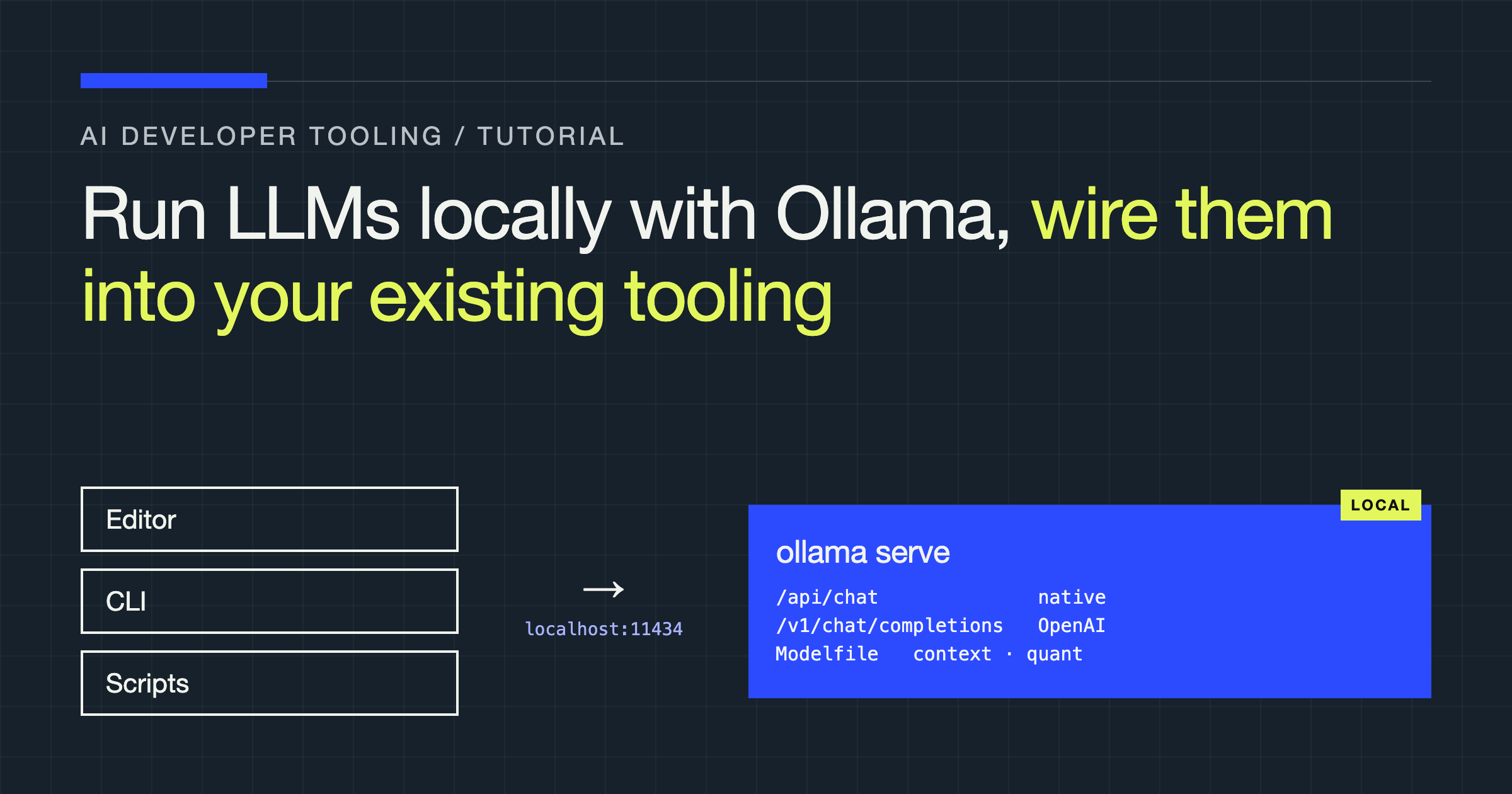
You will install Ollama, pull and serve a language model on your own machine, call it through both its native API and its OpenAI-compatible endpoint, customise it with a Modelfile, and connect it to the editor, CLI, and script workflows you already use. Along the way, you will learn how to choose context length and quantization sensibly, and how to diagnose the failures you are most likely to hit: running out of memory, waiting too long for the first token, and asking a model to do a job it was never built for.
No hosted account is required. Everything below runs against a server on your own machine.
What Ollama Actually Gives You
Ollama is a local model server with a command-line front end. It handles the unglamorous parts of running open-weight models: downloading model files, storing them in a local library, loading them into memory when a request arrives, unloading them when idle, and exposing them over HTTP.
It is not a model, it does not train or fine-tune models, and it does not make a small model smarter than it is. What it removes is integration friction. Instead of writing inference code and managing weights in each project, you get one daemon, one port, and a predictable API every tool on your machine can share. By default the server listens at http://localhost:11434 — the integration point for everything in this article.
Install and Run Your First Model
Install Ollama from the official download for your operating system; on Linux, the install script from the Ollama site is the documented route. Then verify the CLI, pull a model, and run it:
ollama --version
ollama pull llama3.1
ollama run llama3.1
ollama pull downloads a model without running it. ollama run pulls it first if needed, starts the server if necessary, and drops you into an interactive prompt — type /bye to leave it. The model stays loaded for a short idle period afterwards, which is why a second run often feels faster.
Three more commands cover day-to-day management:
ollama list    # models in your local library
ollama ps      # models currently loaded, and how they are running
ollama rm llama3.1   # remove a model from the library
To run the server independently of an interactive session — which you want, once other tools depend on it — start it explicitly with ollama serve. On systems where Ollama installs as a background application, the server may already be running and ollama serve will complain that the address is in use. That error is good news: something is already listening on the port you need.
The Native API: Generate and Chat
The native API is the fullest expression of what Ollama can do. Two endpoints cover most use cases.
Use /api/generate for single-turn completion: one prompt in, one completion out. It suits summarisation, classification, extraction, code generation from a spec, and any self-contained instruction.
curl http://localhost:11434/api/generate -d '{
  "model": "llama3.1",
  "prompt": "Explain the difference between a process and a thread in three sentences.",
  "stream": false
}'
Use /api/chat for multi-turn work. You send the history as an array of messages with role and content, and the model replies in the same shape. The server does not remember your conversation between calls — your client sends the history each time, keeping you in control of exactly what context the model sees.
curl http://localhost:11434/api/chat -d '{
  "model": "llama3.1",
  "messages": [
    { "role": "system", "content": "You are a concise technical reviewer." },
    { "role": "user", "content": "What is wrong with storing passwords in plain text?" }
  ],
  "stream": false
}'
Two details catch people out. First, both endpoints stream by default: you receive a sequence of JSON objects, one per chunk, rather than a single response. Set "stream": false for one complete object, as above, and use streaming deliberately in interactive interfaces. Second, per-request behaviour goes in an options object — fields such as temperature and num_ctx — not as top-level keys.
The same chat call from a script needs no third-party library:
import json
import urllib.request


def chat(messages, model="llama3.1"):
    payload = json.dumps(
        {"model": model, "messages": messages, "stream": False}
    ).encode()
    request = urllib.request.Request(
        "http://localhost:11434/api/chat",
        data=payload,
        headers={"Content-Type": "application/json"},
    )
    with urllib.request.urlopen(request) as response:
        data = json.load(response)
    return data["message"]["content"]


if __name__ == "__main__":
    reply = chat(
        [{"role": "user", "content": "Give me a one-line summary of recursion."}]
    )
    print(reply)
Reach for the native API when you need its options and Modelfile behaviour, or want to avoid adding a dependency just to talk to a local server.
The OpenAI-Compatible Endpoint
Ollama also exposes an OpenAI-compatible endpoint under /v1, centred on /v1/chat/completions. This is the fastest route into existing tooling: any client, editor extension, or framework that lets you override the base URL of an OpenAI-style API can usually be pointed at your local server instead.
from openai import OpenAI

client = OpenAI(
    base_url="http://localhost:11434/v1",
    api_key="ollama",  # Required by the SDK, ignored by Ollama
)

response = client.chat.completions.create(
    model="llama3.1",
    messages=[
        {"role": "system", "content": "You are a concise technical reviewer."},
        {"role": "user", "content": "Name one risk of a very long database transaction."},
    ],
)

print(response.choices[0].message.content)
The placeholder key is not a trick: the official SDKs refuse to construct a client without one, and Ollama ignores its value.
Treat this as a compatibility layer, not a promise of identical behaviour. The shapes line up, which lets existing code run unchanged, but capabilities vary by model. A parameter a hosted model accepts may be ignored locally, and features such as tool calling depend on the model and its chat template, not the endpoint. Test the features you rely on instead of assuming parity from the shape of the JSON.
| Concern | Native API (/api/...) | OpenAI-compatible (/v1/...) |
|---|---|---|
| Best for | Ollama-specific apps and scripts | Reusing existing OpenAI-style code and tools |
| Endpoints | /api/generate, /api/chat, plus model management | Chat completions and related familiar routes |
| Options and Modelfile behaviour | Full access, in Ollama’s own terms | Limited to what maps onto the shared schema |
| Portability of your code | Tied to Ollama | Portable between local and hosted providers |
| Failure surface | Ollama concepts only | Compatibility gaps hidden behind a familiar shape |
Prototype against whichever endpoint your tool already speaks, and standardise on the native API for code you control end to end.
Customise a Model with a Modelfile
A Modelfile packages a base model with the defaults you keep repeating: a system prompt, generation parameters, and a context size. It turns “run the base model, then paste in our instructions” into a named, reusable model.
FROM llama3.1

PARAMETER temperature 0.2
PARAMETER num_ctx 8192

SYSTEM """
You are a code review assistant. Report correctness problems first,
then security, then clarity. Quote the line you mean.
"""
Build and run it like any other model:
ollama create reviewer -f ./Modelfile
ollama run reviewer
Your model now appears in ollama list and answers on both API surfaces under the name reviewer. A caller can still override the packaged defaults per request, so treat the Modelfile as a starting point rather than a lock. Keep Modelfiles in version control with the project they serve: they are configuration, and configuration belongs where the next person can read, diff, and change it.
Context Length and Quantization, Without the Folklore
Context length is how much text the model can consider at once: system prompt, history, documents you paste in, and the reply itself all share that budget. Raising num_ctx allows longer inputs, but the capacity is not free — it consumes more memory for the attention cache and makes long prompts slower to process before generation begins. Set it for the job: short chat and classification rarely need a large window; reviewing a long file genuinely does. If input exceeds the context, the oldest content falls away — why a model can appear to “forget” instructions from the start of a long session.
Quantization is how model weights are stored: at lower precision, which makes the file smaller and lets larger models fit into limited graphics memory, often at some cost to quality. Model tags encode this — q4_K_M describes a more aggressively compressed variant than a higher-bit build of the same model. Qualitatively, moderate quantization of a capable model is usually hard to notice in chat, summarisation, and routine code help, while aggressive quantization shows up first where precision matters: subtle reasoning, long arguments, and code that must be exactly right. The useful comparison is never abstract. It is “the larger model quantized to fit my hardware versus the smaller model that fits comfortably.” Run both against your own prompts and keep the one whose mistakes you prefer.
Wire Ollama into Editors, CLIs, and Scripts
Most integrations reduce to three values: a provider, a base URL, and a model name.
For editor assistants and chat extensions, look for a provider setting named Ollama, or an option to supply a custom OpenAI-compatible base URL. Give it http://localhost:11434 for a native provider, or http://localhost:11434/v1 for a compatible one, then select a model you have already pulled. Pull it from the terminal first — an extension that cannot find a model usually means its settings name does not match ollama list, not that the server is broken.
For tools and scripts you control, put the address in the environment and read it in one place:
export OLLAMA_HOST="http://localhost:11434"
export LOCAL_MODEL="llama3.1"
Many OpenAI-style tools accept an equivalent base-URL variable, although its exact name differs by tool, so check the tool’s own documentation rather than guessing. Either way, keep one configurable endpoint in your code, so switching between local models and a hosted provider is a configuration change, not a rewrite.
OLLAMA_HOST also controls where the server binds. Treat rebinding it beyond your machine as a security decision: Ollama provides no authentication layer like a public API.
Failure Modes and How to Diagnose Them
Out of memory. A model too large for your graphics memory does not always fail loudly. It may load partly on the CPU instead, which works but runs noticeably slower, or fail to load at all. Run ollama ps during a request: a CPU/GPU split tells you the model did not fully fit on the GPU. Fix it with a smaller model, a more quantized build, or a lower num_ctx, so the context cache leaves more room for the weights.
Slow first token. The wait before output starts is not the same as slow generation. It usually combines loading an unloaded model and processing your prompt, which grows with prompt length. If only the first request is slow, the model was cold — keep-alive behaviour keeps it warm during interactive work. If every long prompt starts slowly, trim history, summarise earlier turns, or retrieve only relevant documents.
Model mismatch. Chat, code, embedding, and vision-capable models are different instruments. An embedding model will not hold a conversation, a small chat model will struggle with repository-scale refactoring however you prompt it, and tool calling works only when the specific model supports it. When output is wrong in kind rather than in detail, suspect the model choice before the prompt.
Connection and name errors. “Connection refused” means no server is listening — start Ollama or check the port. “Model not found” means the name does not match your library — compare it against ollama list, including the tag.
Local Versus Hosted: An Honest Tradeoff
| Concern | Local with Ollama | Hosted API |
|---|---|---|
| Privacy | Prompts and documents stay on your machine | Data leaves your machine under the provider’s terms |
| Cost shape | Hardware and electricity you already own | Ongoing per-use billing |
| Capability ceiling | Limited to models your hardware can run | Access to the provider’s largest models |
| Operational burden | You manage models, memory, and updates | Provider manages serving and scaling |
| Availability | Works offline, tied to one machine | Available anywhere, depends on the service |
| Consistency | Same model until you change it | Provider can change models and behaviour |
Neither column wins outright. Local serving is compelling for private documents, offline work, experimentation without meter anxiety, and routine tasks where a modest model is good enough. Hosted APIs remain sensible when you need the strongest available reasoning, must serve many concurrent users, or cannot tie a product to one machine’s hardware.
Verdict
Start with the native API for tools you own, and use the OpenAI-compatible endpoint as the bridge into everything else. Pull a small set of models — one chat, one code, one embedding — evaluate them against your own real prompts, and package the defaults you repeat into Modelfiles stored with your projects.
Be deliberate about the two knobs that matter: set context length for the task rather than maximising it, and choose quantization by fitting the best model your hardware runs well, not the largest model that barely loads. When something feels slow or wrong, check ollama ps, the model name, and the model choice before you touch a prompt. Follow that order and local models become a private, predictable layer in your existing tooling — one address, one library of models, and no rewrite the next time a tool asks where your model lives.