DevOps & observability / Tutorial
Deploy to Managed Kubernetes from GitHub Actions: A Complete CI/CD Walkthrough
Build a GitHub Actions pipeline that tests a Node.js app, publishes its Docker image to GHCR, and deploys it to DigitalOcean Kubernetes.
Your application is containerized, but releasing it still involves building an image locally, pushing it to a registry, connecting to Kubernetes, changing the workload, and watching the rollout. That process is manageable once. Repeated across developers and releases, it becomes slow and error-prone.
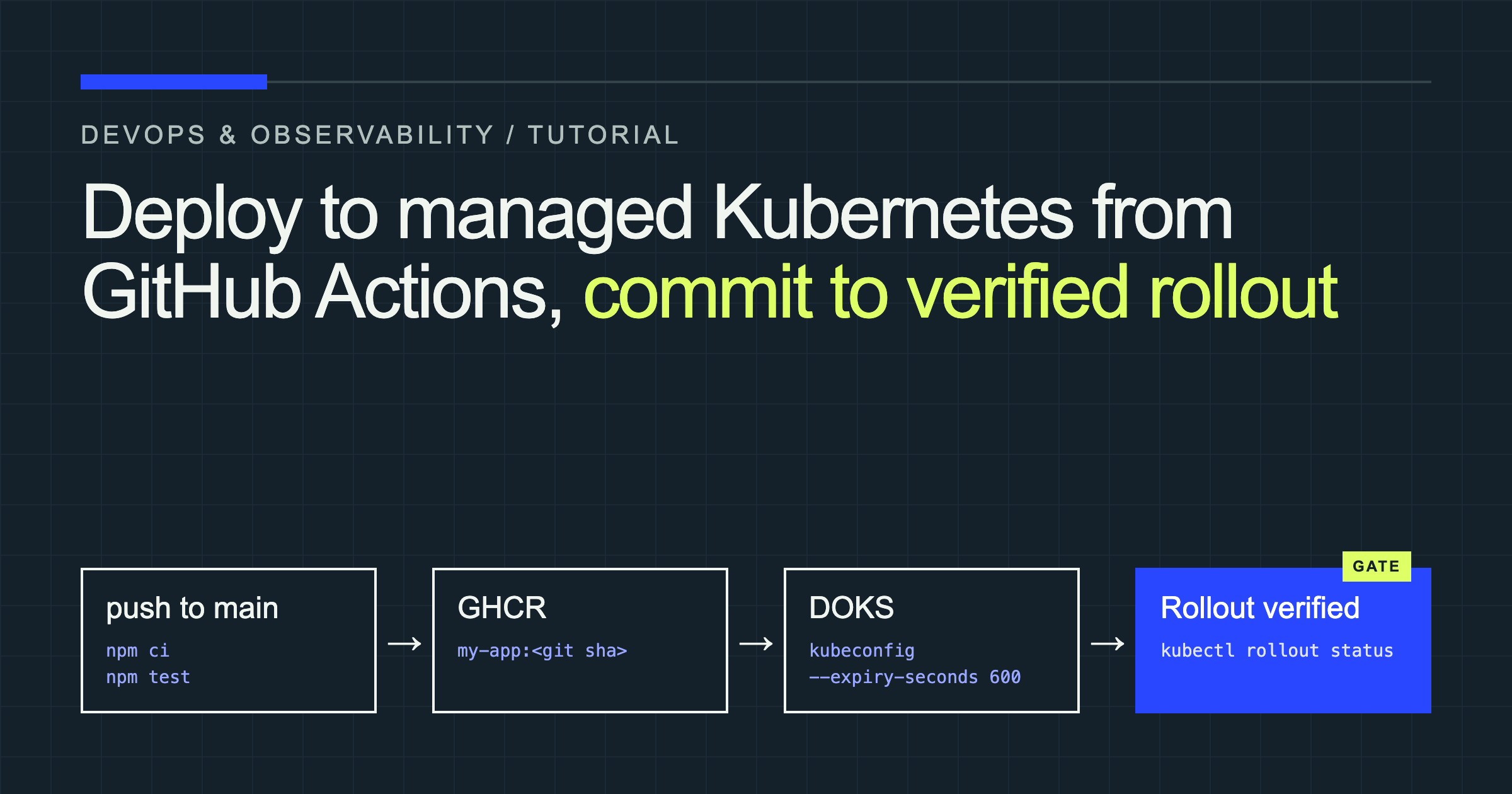
A CI/CD pipeline turns those manual commands into a consistent, traceable deployment process. In this tutorial, GitHub Actions will test a Node.js application, build its Docker image, publish the image to GitHub Container Registry (GHCR), obtain short-lived credentials for a DigitalOcean Kubernetes cluster, deploy the new image, and verify the rollout.
The resulting path is:
Push to main
    → Run tests
    → Build Docker image
    → Push image to GHCR
    → Update Kubernetes Deployment
    → Verify rollout
Although this walkthrough uses DigitalOcean Kubernetes, the same structure works with other managed Kubernetes providers by replacing the authentication steps.
Prerequisites and project setup
You will need:
- A GitHub repository containing a containerized application
- A working
Dockerfile - A
package-lock.jsonfile sonpm cican install deterministic dependencies - A DigitalOcean Kubernetes cluster
- A DigitalOcean API token that can retrieve cluster credentials
kubectlanddoctlinstalled locally for initial setup- Permission to configure GitHub Actions, secrets, variables, and packages
For a custom-scoped DigitalOcean token, include kubernetes:access_cluster and its required scopes. This permits the workflow to retrieve cluster credentials without granting permission to create or delete clusters. DigitalOcean documents the required scopes here.
The example project has this structure:
my-app/
├── src/
├── tests/
├── Dockerfile
├── package.json
├── package-lock.json
├── k8s/
│   ├── deployment.yaml
│   └── service.yaml
└── .github/
    └── workflows/
        └── deploy.yaml
The application is assumed to listen on port 3000 and expose a successful GET /health endpoint. Change those values in the manifests if your application behaves differently. The workflow can also be adapted to Python, Go, Java, or another language by replacing the Node.js setup and test steps.
How the deployment pipeline fits together
Each component has a separate responsibility.
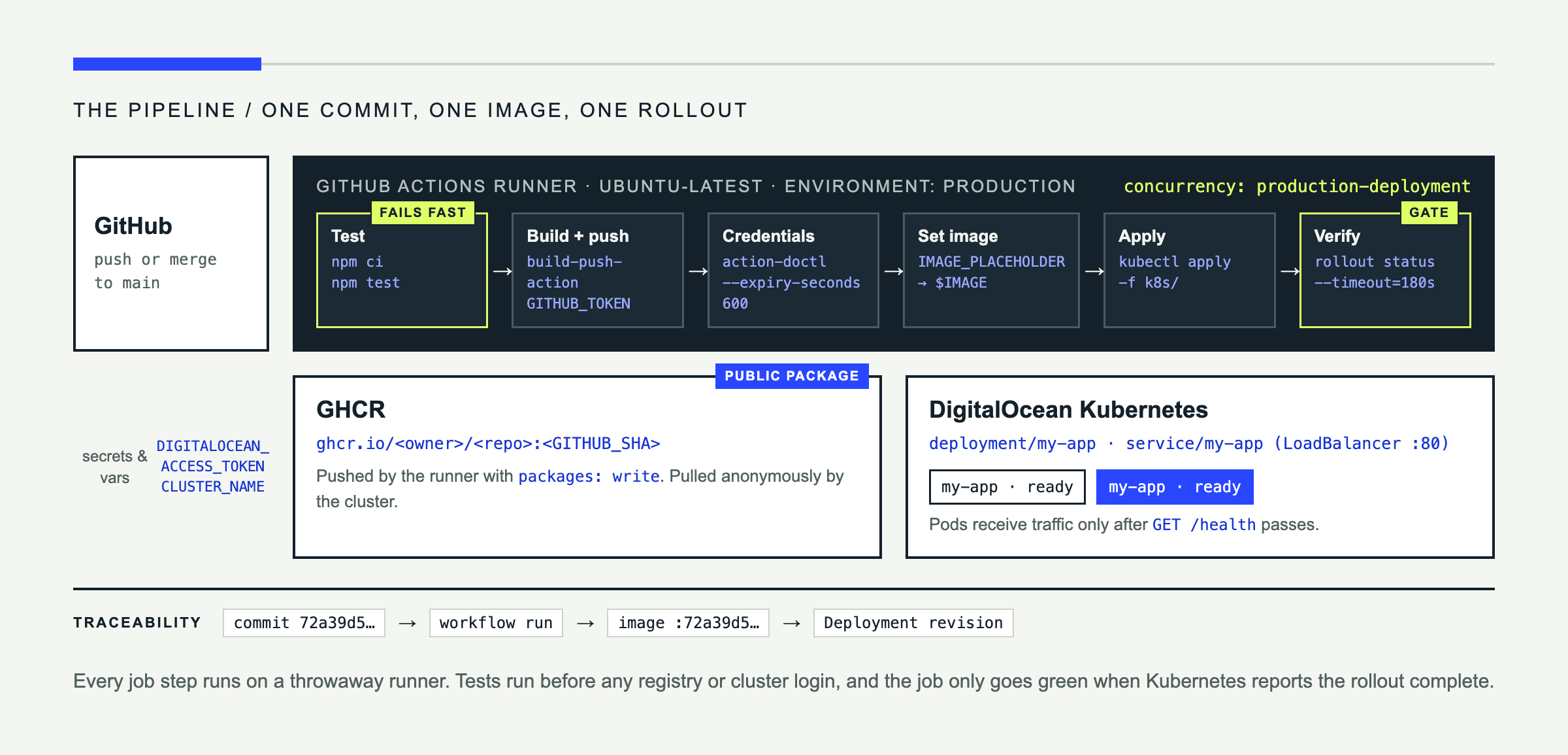
GitHub stores the source code and triggers the workflow when a commit reaches main. GitHub Actions provides a temporary Ubuntu runner that installs dependencies, executes tests, and runs the deployment commands.
GHCR stores the built container image so that it is accessible outside the runner. Every image is tagged with the full Git commit SHA, such as:
ghcr.io/example/my-app:72a39d5...A commit-specific tag creates an explicit connection among the source commit, workflow run, container image, and deployed workload. Unlike relying exclusively on latest, it also lets you identify or redeploy an earlier version without guessing which image it represents.
Finally, Kubernetes pulls the image and performs a rolling update. The workflow watches that rollout and fails if the new Pods do not become ready. Updating a Deployment’s container image changes its Pod template and starts a rollout, as described in the Kubernetes Deployment documentation.
Prepare the Kubernetes cluster
Connect to the cluster
Authenticate doctl, then save the cluster configuration locally:
doctl auth init
doctl kubernetes cluster kubeconfig save my-cluster
kubectl get nodes
The kubeconfig records the cluster API address, authentication configuration, and Kubernetes context. kubectl reads it to determine which API server to contact and which credentials to use. DigitalOcean’s command merges the new context into your existing kubeconfig. For more details, see DigitalOcean’s cluster connection guide.
kubectl get nodes should return the cluster’s worker nodes in a Ready state.
Create the Deployment
Add k8s/deployment.yaml:
apiVersion: apps/v1
kind: Deployment
metadata:
  name: my-app
spec:
  replicas: 2
  revisionHistoryLimit: 5
  selector:
    matchLabels:
      app: my-app
  template:
    metadata:
      labels:
        app: my-app
    spec:
      containers:
        - name: my-app
          image: IMAGE_PLACEHOLDER
          ports:
            - name: http
              containerPort: 3000
          readinessProbe:
            httpGet:
              path: /health
              port: http
            initialDelaySeconds: 5
            periodSeconds: 5
replicas requests two application instances. The selector must match the labels on the Pod template so the Deployment can manage its Pods. The container name, my-app, identifies the container whose image each release changes.
IMAGE_PLACEHOLDER is not a real image. Before applying the manifest, the workflow replaces it with the commit-tagged image, so the Deployment only ever references images that exist in GHCR. Because the placeholder is replaced in CI, deploy this file through the workflow rather than with a local kubectl apply.
The readiness probe prevents Kubernetes from sending traffic to a Pod until /health responds successfully. If the probe is wrong or the application cannot start, the rollout remains incomplete, which is preferable to directing users to a broken instance.
Expose the application
Create k8s/service.yaml:
apiVersion: v1
kind: Service
metadata:
  name: my-app
spec:
  type: LoadBalancer
  selector:
    app: my-app
  ports:
    - name: http
      port: 80
      targetPort: http
A LoadBalancer Service asks the cloud provider to provision an external load balancer and route port 80 to the Pods’ named http port. Provisioning can take several minutes, and the load balancer may add to your cloud bill.
Configure GitHub secrets and permissions
Open the repository and go to Settings → Secrets and variables → Actions.
Under Secrets, create:
| Secret | Purpose |
|---|---|
DIGITALOCEAN_ACCESS_TOKEN | Allows doctl to retrieve cluster credentials |
Under Variables, create:
| Variable | Example |
|---|---|
CLUSTER_NAME | my-cluster |
The cluster name is not sensitive, so it does not need to be stored as a secret. Never commit the API token or a downloaded kubeconfig file.
You do not need to create a separate registry password. GitHub automatically creates GITHUB_TOKEN for each workflow run, and the workflow grants it packages: write permission. GitHub recommends using this token to publish packages associated with the workflow repository. Its GHCR publishing guide documents the corresponding login settings.
This tutorial lets Kubernetes pull the image anonymously by making its GHCR package public. New GHCR packages are private by default, while public container packages can be pulled without authentication.
Review GitHub’s package visibility documentation before changing that setting.
Build the GitHub Actions workflow
Create .github/workflows/deploy.yaml with the complete pipeline:
name: Test, publish, and deploy

on:
  push:
    branches:
      - main

concurrency:
  group: production-deployment
  cancel-in-progress: false

permissions:
  contents: read
  packages: write

env:
  REGISTRY: ghcr.io
  CLUSTER_NAME: ${{ vars.CLUSTER_NAME }}
  NAMESPACE: default

jobs:
  deploy:
    name: Test, publish, and deploy
    runs-on: ubuntu-latest
    timeout-minutes: 20
    environment: production

    steps:
      - name: Check out repository
        uses: actions/checkout@v6

      - name: Set up Node.js
        uses: actions/setup-node@v6
        with:
          node-version: "22"
          cache: npm

      - name: Install dependencies
        run: npm ci

      - name: Run tests
        run: npm test

      - name: Set image reference
        shell: bash
        run: |
          echo "IMAGE=${REGISTRY}/${GITHUB_REPOSITORY,,}:${GITHUB_SHA}" \
            >> "$GITHUB_ENV"

      - name: Set up Docker Buildx
        uses: docker/setup-buildx-action@v3

      - name: Log in to GHCR
        uses: docker/login-action@v3
        with:
          registry: ${{ env.REGISTRY }}
          username: ${{ github.actor }}
          password: ${{ secrets.GITHUB_TOKEN }}

      - name: Build and publish image
        uses: docker/build-push-action@v6
        with:
          context: .
          push: true
          tags: ${{ env.IMAGE }}

      - name: Install doctl
        uses: digitalocean/action-doctl@v2
        with:
          token: ${{ secrets.DIGITALOCEAN_ACCESS_TOKEN }}

      - name: Save short-lived cluster credentials
        run: |
          doctl kubernetes cluster kubeconfig save \
            --expiry-seconds 600 \
            "$CLUSTER_NAME"

      - name: Set the image in the manifest
        run: |
          sed -i "s|IMAGE_PLACEHOLDER|${IMAGE}|" k8s/deployment.yaml
          grep -qF "image: ${IMAGE}" k8s/deployment.yaml

      - name: Apply Kubernetes manifests
        run: kubectl apply -f k8s/ --namespace "$NAMESPACE"

      - name: Verify rollout
        run: |
          kubectl rollout status deployment/my-app \
            --namespace "$NAMESPACE" \
            --timeout=180s
The trigger covers direct pushes and pull-request merges that create a commit on main. The concurrency group prevents two production deployments from running simultaneously. With cancel-in-progress: false, an active deployment is allowed to finish before a pending one begins. GitHub documents concurrency as a way to limit an environment to one deployment at a time in its deployment guidance.
npm ci and npm test execute before registry or cluster authentication. If either command returns a nonzero exit code, GitHub stops the job and marks the failed step in the Actions interface.
The image-reference step lowercases the repository path because container image names must be lowercase. It combines that path with github.sha, producing a unique image for the exact commit being deployed.
Building creates the container layers on the runner; pushing uploads those layers and their manifest to GHCR. The cluster cannot deploy the image until it is available from a registry it can reach.
The DigitalOcean action installs and authenticates doctl. The next step requests credentials that expire after 600 seconds. DigitalOcean supports --expiry-seconds specifically for controlling credential lifetime, as shown in its GitHub Actions deployment guide.
The manifest step writes the commit-tagged image into the runner’s copy of deployment.yaml. The grep check fails the job if the substitution did not happen, for example because the placeholder was renamed. kubectl apply then sends both manifests in a single update. Changing the image changes the Pod template, so each deployment creates exactly one new Deployment revision that points at a real image. That keeps kubectl rollout undo meaningful: the previous revision is the previous release.
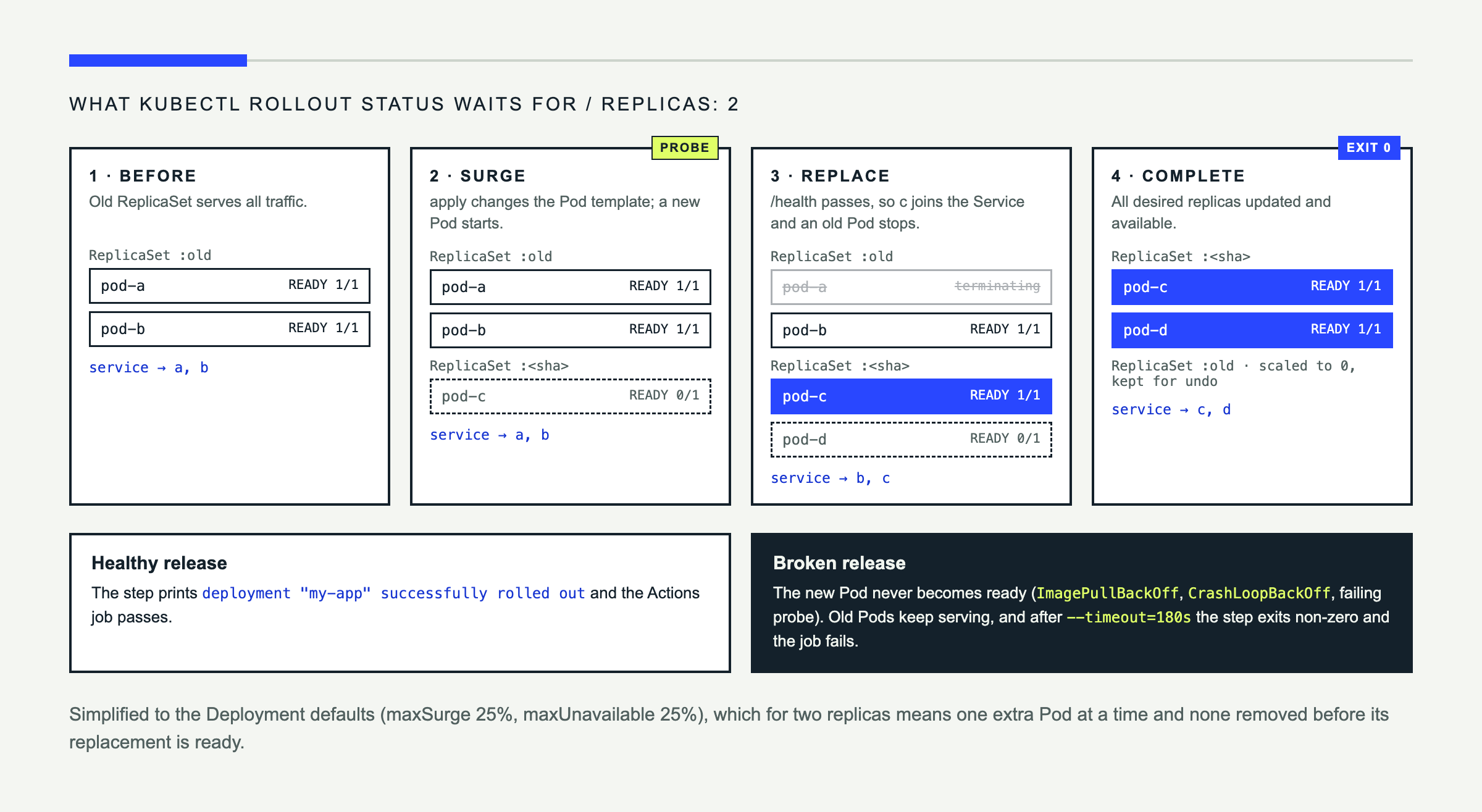
Finally, kubectl rollout status waits for the new Pods to become available. It exits with a nonzero status if the rollout fails or exceeds the timeout, causing the Actions job to fail instead of reporting a false success.
Test the pipeline end to end
Change something visible in the application, such as its response body or displayed version, then commit and push:
git add .
git commit -m "Update application response"
git push origin main
Open the repository’s Actions tab and select the new run. You should see the tests pass, a SHA-tagged image appear in GHCR, cluster credentials get created, and the rollout complete.
Check the cluster locally:
kubectl get pods
kubectl get deployments
kubectl get services
The Pods should show READY values such as 1/1. The Deployment should report that its desired replicas are ready and available. The Service will initially show <pending> under EXTERNAL-IP while DigitalOcean provisions the load balancer.
Once an address appears, test the public endpoint:
curl http://EXTERNAL_IP/The response should contain your latest change. Pod readiness demonstrates that the health check succeeds; Deployment availability confirms that the required replicas can serve traffic; rollout completion confirms that Kubernetes replaced the previous version successfully.
Troubleshoot common deployment failures
| Issue | Likely cause | Suggested fix |
|---|---|---|
ImagePullBackOff | Wrong tag or unavailable private image | Check the image reference and GHCR visibility or pull secret |
Unauthorized | Missing or insufficient credentials | Verify the DigitalOcean token and scopes |
CrashLoopBackOff | Application exits after starting | Inspect container logs and configuration |
| Rollout timeout | Pods never become ready | Check probes, events, resources, and image pulls |
| Tests fail | Test or dependency error | Open the failed Actions step and inspect its output |
Start Kubernetes debugging with:
kubectl describe pod POD_NAME
kubectl logs POD_NAME
kubectl get events --sort-by=.metadata.creationTimestamp
describe exposes scheduling, probe, and image-pull failures. logs shows application output, while events reveal cluster-level problems such as insufficient resources or unsuccessful load-balancer provisioning.
Security and production improvements
The example explicitly limits GITHUB_TOKEN to reading repository contents and writing packages. Continue that least-privilege approach for every workflow and use short-lived cluster credentials rather than committing a long-lived kubeconfig.
For production, pin third-party actions to reviewed, full-length commit SHAs instead of movable version tags. GitHub recommends this because it ensures that a workflow runs the exact action code you approved. See its Actions security guidance.
Protect the production GitHub environment with deployment-branch restrictions or required reviewers when your repository and plan support them. Environments can delay access to their secrets until protection rules pass.
Readiness probes and rolling updates help preserve availability by keeping unready Pods out of service while Kubernetes gradually replaces the old ReplicaSet. If an application release is defective, you can roll back:
kubectl rollout undo deployment/my-appRollback depends on usable Deployment revision history. It does not reverse database migrations, messages already published, or changes to external systems. Add image vulnerability scanning, dependency checks, admission controls, monitoring, and post-deployment health tests before treating the pipeline as production-ready.
From manual deployment to a repeatable release
You now have a complete path from a commit on main to a verified Kubernetes rollout. GitHub Actions tests the application, builds a traceable Docker image, publishes it to GHCR, retrieves short-lived DOKS credentials, updates the Deployment, and fails visibly if the new Pods do not become ready.
That removes repetitive release commands while giving every deployment a corresponding commit, image tag, and workflow log.
Natural next steps are to introduce separate staging and production environments, run integration tests against the deployed service, require production approvals, use private registry authentication, and connect rollout results to monitoring and alerting.