DevOps & observability / Tutorial
SLOs and Error Budgets a Small Team Can Actually Run
Build a lean SLO practice for a small team: pick few user-facing SLIs, set defensible targets, add burn-rate alerts, and enforce an error budget policy.
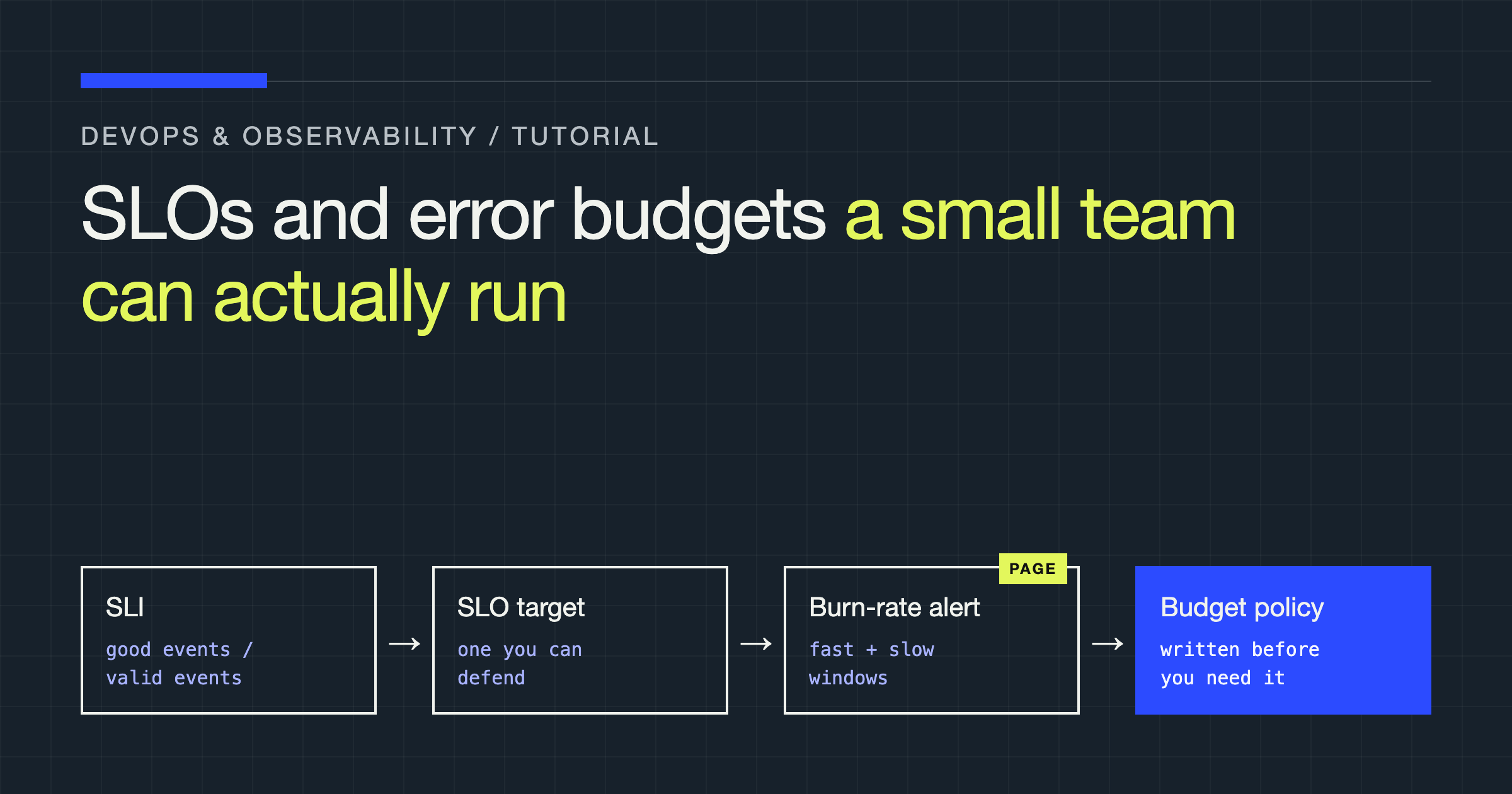
You will build a minimal SLO system you can run with a small team: a handful of user-facing service level indicators (SLIs), service level objectives (SLOs) with explicit targets, multi-window burn-rate alerts that page only when user impact is real, and a written error budget policy that decides in advance what happens when the budget runs out. You will also learn what to leave out, because the common failure is adopting a framework built for a large organisation and drowning in it.
Start with users, not infrastructure
An SLI measures something a user experiences. An SLO is a target for that measurement over a rolling window. The error budget is the amount of failure the target permits — the fraction you can spend on deployments, experiments, and unavoidable incidents.
That framing reverses how many teams measure reliability. CPU saturation, memory pressure, and pod restarts are causes, not experiences. They belong on dashboards and in investigations, rarely in an SLO: a system can be hot and still serve every request well, and it can look healthy on infrastructure graphs while returning errors to every user.
Start with two questions: what does the user try to do, and how would you know from the outside whether it worked and was fast enough? If you cannot answer the second with data you collect, your first job is instrumentation, not target-setting. An SLO built on a proxy you do not trust will be argued about during every incident, exactly when you need it most.
Pick a small set of SLIs
Resist an SLO per service, endpoint, and component. Each SLO creates alerts, reviews, and policy decisions. A small team can operate three to five; beyond that, they become decoration.
Cover the journeys that matter:
- Availability: the proportion of valid requests that return a successful response.
- Latency: the proportion of successful requests completed faster than a threshold chosen because users feel it, not because it looks round.
- Freshness: the proportion of time data is no older than an agreed age, for pipelines, feeds, and indexes.
- Correctness: the proportion of jobs or transactions that complete with a valid result, for billing and asynchronous work where a
200response does not mean the work happened.
Prefer event-based SLIs over time-based ones. “Proportion of good requests” weights busy periods more heavily, which matches user impact. “Proportion of good minutes” treats a silent minute the same as your busiest, and hides short, severe outages inside an acceptable average.
Write rules for the edge cases next to each SLI definition:
- Client errors: a
4xxcaused by the client is normally not a failure; a4xxcaused by a bad deployment, broken routing, or an expired certificate is. - Retries: count the user’s original attempt once where you can identify it. Counting every retry inflates the denominator and distorts the result either way.
- Low traffic: a ratio based on a handful of requests is noise. Require a minimum event volume before alerts can page, and use synthetic checks for very low-traffic services instead.
- Missing data: no data is not success. If your metrics pipeline stops, that gap should alert separately, not read as a perfect ratio.
Choose targets you can defend
A target is a product and cost decision, not a badge of ambition. Tighter targets demand more redundancy, slower change, and more on-call load. Looser targets push the cost onto users instead.
| Target style | What it signals | Main risk | Fits when |
|---|---|---|---|
| Far above current performance | Ambition | Budget permanently exhausted, policy ignored | Rarely as a paging SLO; use as an internal goal |
| Matched to user need and capability | A real contract | Needs honest measurement and renegotiation | Most user-facing services |
| Deliberately loose | Tolerance for change | Users feel pain the SLO never registers | Internal tools, early products, retryable batch jobs |
Set a first target from the performance you actually delivered over a representative window, asking whether users were satisfied, and set the SLO slightly below what you can sustain — not at the best period you ever had. Revisit it after living with the alerts for a while.
Keep targets at the journey level, not the hop level. If a request crosses three internal services, users only see the combined result; budget for that, and keep per-service goals as diagnostics.
A worked example
This example is illustrative — substitute your own service, threshold, and window. Suppose your checkout API has two SLOs sharing one source: an availability SLO, that at least the target proportion of valid requests over a rolling window return successfully, and a latency SLO, that at least the target proportion of successful requests complete within your chosen threshold.
Keep them separate rather than blending them into one score. When a blended number moves, you will not know whether the problem is errors or slowness, and the fix is usually different.
The error budget is the complement of the target: the small fraction of requests allowed to fail. Express it in requests as well as proportion — “a few hundred failed requests left” is actionable; an abstract percentage is not.
Define the SLIs as recording rules
Do not calculate SLOs inside dashboard panels nobody else can reuse. Encode them as recording rules so dashboards, alerts, and reviews all read the same numbers. This example uses Prometheus conventions; the structure translates to other metrics systems.
groups:
  - name: slo-checkout-availability
    interval: 30s
    rules:
      - record: checkout:http_requests:good_ratio_5m
        expr: |
          sum(rate(http_requests_total{job="checkout", code!~"5.."}[5m]))
          /
          sum(rate(http_requests_total{job="checkout"}[5m]))
      - record: checkout:http_requests:good_ratio_1h
        expr: |
          sum(rate(http_requests_total{job="checkout", code!~"5.."}[1h]))
          /
          sum(rate(http_requests_total{job="checkout"}[1h]))
      - record: checkout:http_requests:good_ratio_6h
        expr: |
          sum(rate(http_requests_total{job="checkout", code!~"5.."}[6h]))
          /
          sum(rate(http_requests_total{job="checkout"}[6h]))
Three details make or break this. First, decide label discipline before writing rules: a new code, route, or job value after a deployment can silently drop out of a selector and flatter the ratio. Second, use the same windows your alerts use, so the number you see is the number that paged you. Third, test the rules like code: after any instrumentation change, compare the recorded ratio against raw counts for a period that includes a real failure.
For latency, record a parallel ratio from histogram bucket counts over the same window. It is more stable for alerting than a quantile computed on the fly, and it states the contract plainly: this share of requests was fast enough.
Alert on burn rate, not on symptoms
A single failed request is not an incident, and a fixed error-rate threshold is a poor pager: set it low and you page on noise; set it high and you sleep through a slow bleed that exhausts the budget.
Burn rate asks a better question: at the current rate of failure, how fast are you consuming the budget? A burn rate of 1 consumes it exactly over the window. A much higher rate means the whole window’s budget will be gone in a small fraction of it — which is when you want a page, while there is still time to act.
groups:
  - name: slo-checkout-burn-rate
    rules:
      - alert: CheckoutBudgetBurningFast
        expr: |
          (1 - checkout:http_requests:good_ratio_1h) > (14.4 * 0.001)
          and
          (1 - checkout:http_requests:good_ratio_5m) > (14.4 * 0.001)
        for: 2m
        labels:
          severity: page
        annotations:
          summary: "Checkout is burning its error budget fast"
      - alert: CheckoutBudgetBurningSlow
        expr: |
          (1 - checkout:http_requests:good_ratio_6h) > (6 * 0.001)
        for: 15m
        labels:
          severity: ticket
        annotations:
          summary: "Checkout is burning its error budget slowly"
In this illustrative configuration, 0.001 is the allowed failure fraction from the worked example, and the multipliers are thresholds you tune to your window and tolerance. Adapt both to your own target; do not copy them blindly to a different SLO.
The pattern matters more than the numbers. The short confirming window stops you paging on a stale long window after recovery; the long window stops you paging on a brief spike that costs almost nothing. Requiring both makes burn-rate alerts quieter and more trustworthy than threshold alerts. Route the fast alert to a page, the slow alert to a ticket, and budget trend to a dashboard nobody is notified about.
Alert separately, at ticket severity at most, on the observability pipeline itself — recording rules producing no data, or a scrape target disappearing. Never page on a missing signal as if it were user impact until you have confirmed users are affected, but never let silence pass as health either.
Write the error budget policy before you need it
An SLO without a policy is just a graph. The policy is a short document, agreed with whoever owns product priorities, stating what changes at each level of budget consumption. Write it while things are calm; negotiating it during an outage produces the worst version.
# Error budget policy — checkout

## Scope
Applies to the checkout availability and latency SLOs.
Targets and SLI definitions live with the recording rules.

## When budget remains
- Normal release process applies.
- Planned reliability risks and experiments are allowed.

## When budget is at risk
- No high-risk changes without a second reviewer and a rollback plan.
- Reliability work is prioritised over feature work for this service.

## When budget is exhausted
- Feature releases for this service are frozen.
- Exceptions need explicit approval from the named service owner,
  a stated reason, and an expiry.
- Work focuses on reliability until budget recovers as the window rolls.

## Always allowed
- Security, legal, and compliance fixes, and fixes for the
  incident that exhausted the budget.
Notice what the policy does not do: it does not freeze all work everywhere, and it does not pretend a freeze is permanent — because the window rolls, budget returns as old failures age out, provided new failure stays low. A scoped freeze with named exceptions will actually be followed; a blanket, indefinite one will be quietly routed around. Decide in the same document who can declare the budget exhausted and where remaining budget is published. If the answer is “we will figure it out at the time,” you do not have a policy yet.
Operate it on a boring cadence
Review remaining budget and the biggest sources of consumption regularly — weekly is a workable rhythm for a small team. Keep it decision-oriented: which SLO consumed the most budget, on what cause, and was that spend planned (a release or experiment) or unplanned (an incident or bad configuration)?
Categorise causes plainly. Teams often discover that a few repeated, unglamorous causes — a flaky dependency, a deployment step, a noisy background job — account for most unplanned spend. Fixing one is worth more than adding another SLO.
When a dependency burns your budget, tag consumption by cause where you can, so the conversation with its owner is evidence-based. If it cannot support your SLO, your options are resilience (timeouts, retries with backoff, caching, graceful degradation), honestly renegotiating your target, or accepting the risk explicitly.
Avoid the mistakes that kill small-team SLOs
Too many SLOs. Every SLO beyond the few you review becomes unowned. If nobody can say what happens when a budget empties, delete it or demote it to a dashboard metric.
Vanity targets. Choosing the tightest target you have heard of, rather than one tied to user need and your capacity, guarantees a permanently exhausted budget and a policy everyone ignores.
Paging on everything. If an alert does not correspond to user impact and a required human action, make it a ticket or a dashboard entry. Alert fatigue is itself a reliability problem: teams paged constantly start silencing the channel a real page will later need.
SLOs on internal components only. A database or queue can meet its target while the journey fails at the seams between components. Keep component measures for diagnosis; put SLOs where users feel outcomes.
Averaging away the pain. Aggregate rollups hide the one journey, region, or segment having a terrible time. Keep a view sliced by a dimension users experience, and investigate when a slice diverges.
Treating the budget as a target to spend. The budget permits sensible risk; it does not justify carelessness because room remains. Spending it on a tested release with a rollback plan is the point.
No owner. Every SLO needs a named person or role responsible for its definition, alerts, and policy decisions. Unowned SLOs drift as instrumentation changes, invisibly, until the number is challenged in an incident.
Retire SLOs as deliberately as you create them. Services change and journeys move; an SLO that no longer describes something a user does teaches the team to distrust all of them.
Verdict and recommendation
Start with two or three SLOs on your most important journey: availability first, latency second, freshness or correctness only if that journey depends on it. Define each SLI as a ratio of good events to valid events, encode it in recording rules, and set a target from what users need and what you can sustain.
Add two alert tiers — a multi-window burn-rate page for fast, confirmed consumption, and a ticket for slow burn — then write a one-page policy with a scoped release freeze, named exceptions, and a named owner, before the budget first runs out.
Do not start with a platform, a large catalogue, or targets chosen for how they sound. The teams that get value from SLOs are the ones whose few objectives are trusted, whose alerts mean something, and whose policy is followed when it becomes inconvenient. Expand only when a real user journey has no SLO covering it.