Documentation & DX / Tutorial
Error Messages Are Documentation: A Field Guide to Writing Failures Users Can Fix
A practical method for writing error messages that name the problem, state the cause, and hand the user a fix they can actually perform.
By the end of this guide, you will have a repeatable method for writing error messages that do the work documentation is supposed to do: explain what happened, in the user’s terms, and get them moving again. An error message is documentation delivered at the moment of maximum need, to a reader who did not choose to read it. It is also, for most products, the least edited text in the entire system, often written in a hurry by whoever implemented the check, in the vocabulary of the code that raised it. This guide treats the error message as a writing problem with a structure you can apply, review, and test.
Start from the reader’s situation, not the system’s
When an error fires, the user knows three things: what they were trying to do, what they gave the system, and that it did not work. The system knows a great deal more, and the classic failure of error writing is reporting the system’s knowledge in the system’s language. “Invalid input” reports a validation result. “Authentication failed” reports a subsystem’s conclusion. Neither tells the reader which input, which credential, or what to change. The reader is left to debug your product from the outside, with the least information and the most frustration of anyone involved.
So the first discipline is translation. Before writing the message, state the failure from the user’s side: what were they attempting, and what, in terms they recognise, prevented it? “The file you selected is larger than the upload limit” is user-side. “Payload exceeds maximum size” is system-side. Same event, and only one of the two gives the reader something to act on. If you cannot state the failure in user terms, that is diagnostic: the check itself may be bundling several different failures into one message, and no wording will rescue a message that means three things.
The four parts of a fixable error
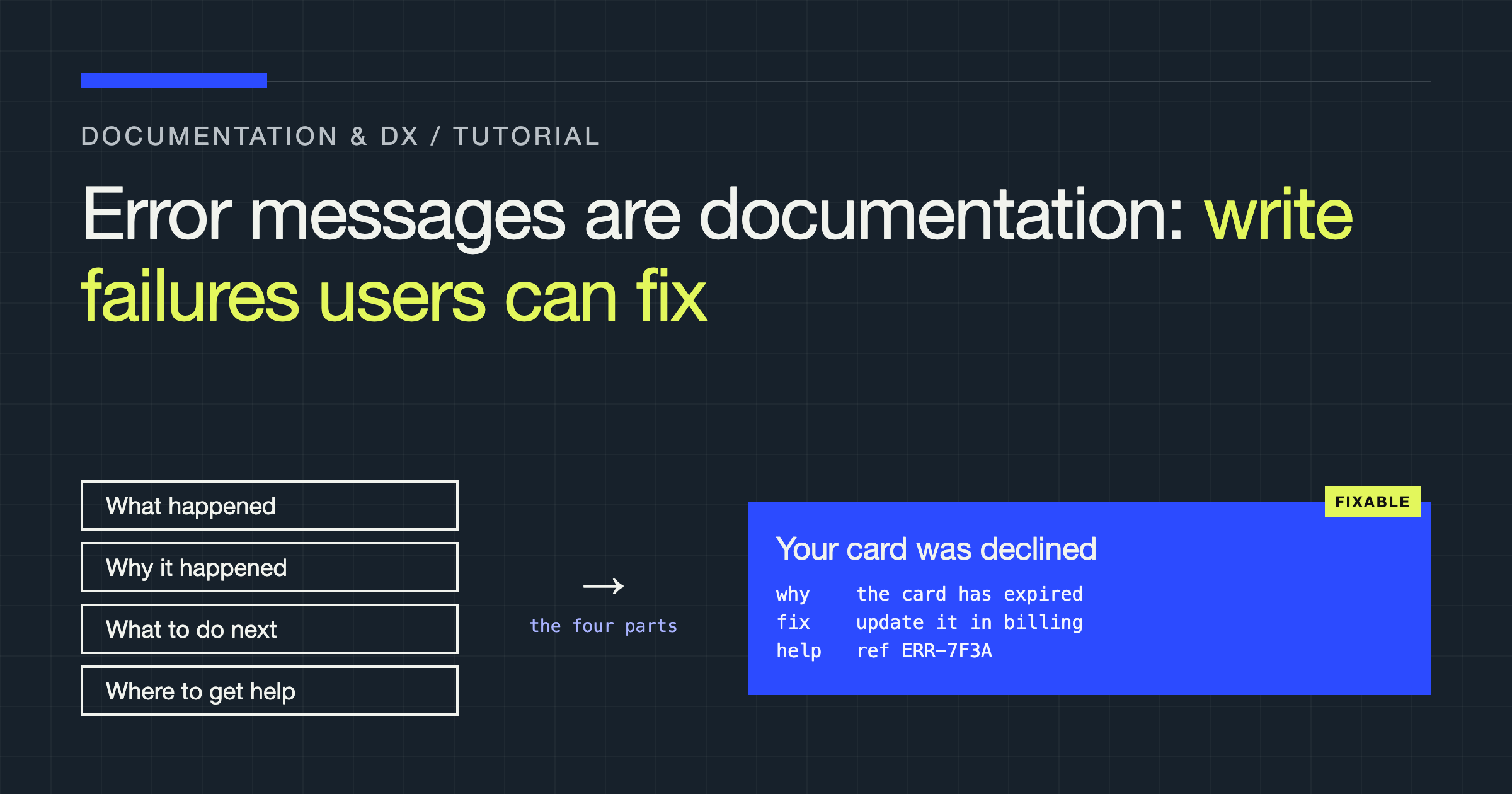
A fixable error message carries up to four parts, in this order. First, what happened, stated as a plain fact about the user’s action: “Your payment method was declined,” not “transaction processing error.” Second, why it happened, at the level the user can reason about: “The card’s expiry date has passed.” Third, what to do next, as a concrete action the user can perform now: “Update the card details in billing settings and try again.” Fourth, where to get help if the fix does not work, ideally a support route carrying the error’s reference code so the user does not have to re-explain the situation from the beginning.
Not every error needs all four parts, and padding a simple message to fit the template makes it worse. A mistyped field name in a request usually needs the first and third parts, precisely stated: which field, and what the field should be. But the parts you omit should be omitted by decision, not by default. The commonest structural defect in real systems is the missing third part: messages that diagnose accurately and then abandon the reader at the exact moment they are ready to act.
Name the offending value, field, or object
Specificity is the difference between an error message and an error label. “One or more fields are invalid” forces the reader to re-inspect everything they submitted. “The ‘email’ field must contain an address” ends the search immediately. Wherever the system knows which value failed, the message should say so, echoing the value back when it is safe to do so and naming the constraint it violated: what was received, what was expected, and in what format. This pattern, received versus expected, resolves the majority of input errors without any further help.
Two cautions keep specificity honest. Do not echo sensitive values; a message can name the credential type and its problem without printing the credential. And do not state a cause you are guessing at. If the system knows the request failed but not why, say that plainly and give the next diagnostic step, rather than dressing a guess as a diagnosis. A confident wrong cause is worse than an honest unknown, because it sends the reader fixing the wrong thing.
Separate the audience: user text and diagnostic detail
Many error-writing arguments dissolve once you accept that an error has two audiences with two different needs. The user needs the four parts above. The engineer on call needs the internal state: the exception, the request identifier, the values that tripped the check. Forcing both into one string produces messages that frighten users and still underserve engineers. Keep them apart. The user sees clean, actionable text and a short reference code. The code joins the user text to the full diagnostic record in the logs, where the detail belongs and where it can be complete without restraint.
This separation has a design consequence worth stating: the reference code is part of the writing. It should be short enough to read aloud, stable enough to search, and shown to the user with a reason to keep it: “If you contact support, quote reference” followed by the code. Support conversations that begin with a reference instead of a retelling are shorter for everyone, and users who learn that the code works will start volunteering it.
| Pattern | Reads like | Verdict |
|---|---|---|
| System conclusion | “Request failed with a server error” | No cause, no action; the reader can only retry and hope |
| Blame without detail | “Invalid input, please check your entries” | Transfers the debugging to the reader |
| Received versus expected | “The ‘limit’ value must be a whole number; the request sent text” | Names the field, the fault, and the fix in one line |
| Action-first | “Your session has expired. Sign in again to continue; your work is saved” | States the event, the remedy, and reassures about consequences |
Write for the states around the error
Errors rarely arrive alone, and the surrounding states are part of the message whether you write them or not. An empty state that says “no results” when the real story is “your filter excludes everything” teaches the user the wrong lesson about their data. A loading failure that offers only a retry button, with no word on whether retrying is safe, makes cautious users afraid to click it. When you write an error, write its neighbours: what the user sees while waiting, what they see when nothing matches, and what they are told about whether their work, their place, or their data survived the failure. That last point, the consequence statement, is the most neglected sentence in error writing and the one users need most: did the failed action change anything, charge anything, delete anything, or is everything exactly as it was?
Test messages the way you test code
Error text can be reviewed like any other interface copy, and it should be, with a checklist rather than taste. For each message ask: does it state what happened in user terms? Does it name the specific field, value, or object at fault? Does it give an action the user can perform immediately? Does it state the consequences for their data or progress? Does it carry a reference for support? Does it avoid internal vocabulary, ticket-speak, and blame? A message that fails the first three questions is not finished, and a catalogue of messages that passes them is a genuine product asset.
Then test with people, cheaply. Hand a reader the message and the screen it appears on, and ask two questions: what do you think happened, and what would you do next? You are not looking for opinions on tone. You are checking whether the message transmits the diagnosis and the remedy to someone who has never seen the system before. When the reader’s answers diverge from the truth, the message is wrong, and the divergence tells you exactly which part to rewrite.
Tone: plain, firm, and never cute
Everything above is structure; tone is what the reader feels while using it. The right register for an error is the register of a competent colleague delivering bad news efficiently: plain words, complete sentences, no jargon, no exclamation, and no blame aimed at the reader. “You entered an invalid date” and “that date is not in a recognised format” describe the same event; only one of them makes the reader the problem. Write about the value, the request, or the state, not about the person’s competence, and the message stays usable even when the reader is already frustrated.
Two temptations to refuse. The first is humour. A playful error message is charming exactly once, to a reader who was not depending on the task, and irritating every time after, especially when the failure costs the reader time or money. The second is the apology that substitutes for information. “Sorry, something went wrong” spends the reader’s patience and buys nothing; an apology earns its place only alongside the cause and the remedy, where it reads as accountability rather than filler. If you must choose between apologising and explaining, explain. Explanation is the apology that actually helps.
Verdict
Write error messages as documentation, because that is what they are: the only page many users will ever read closely. State the failure from the user’s side, name the specific thing at fault, give the fix as an action they can take now, state the consequences for their work, and keep the engineering detail one reference code away. Teams that hold this standard find that support tickets shrink in the specific places where messages improved, because a reader who can fix the problem rarely needs to report it.