Merchant-facing articles / Tutorial
Cash vs. card trips on Bolt: how your balance works and how to clear a negative balance
A negative balance in your Bolt Driver app means you owe Bolt commission from cash trips where you received payment directly from passengers.
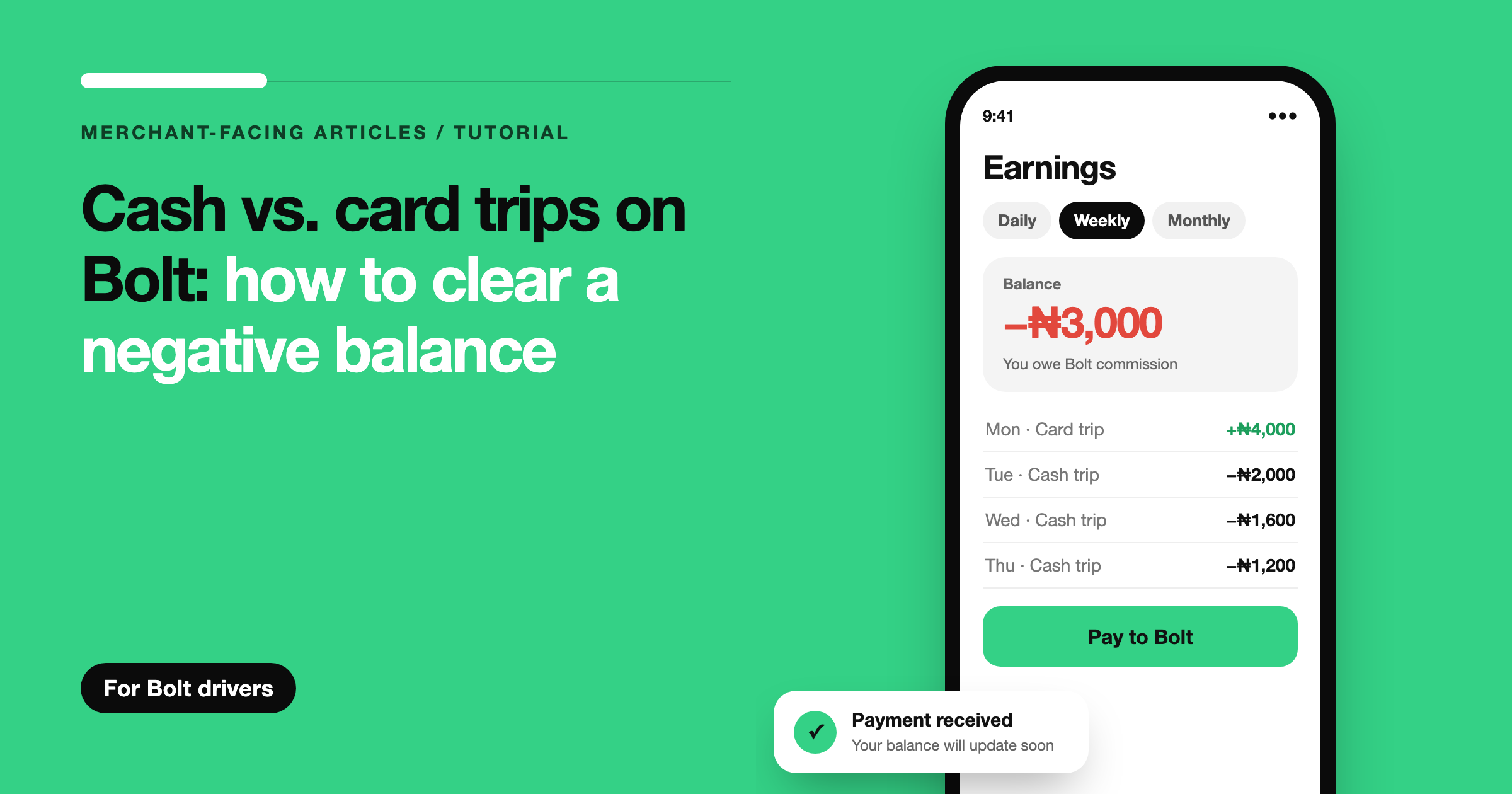
A negative balance in your Bolt Driver app means you owe Bolt commission from cash trips where you received payment directly from passengers. It is not a penalty or a fine. You can clear your negative balance by following these payment steps.
How Bolt’s commission works
Bolt charges a 20% commission on the final fare of each trip in Nigeria, whether the passenger pays by cash or card. This commission also applies to cancellation fees.
However, Bolt does not charge commission on:
- Tips
- Bonuses
- Additional airport fees
- Toll fees
- Operational fees
For example, if you complete a trip with a fare of ₦5,000 and receive a ₦500 tip, Bolt’s commission is ₦1,000. You keep ₦4,500, including your full tip.
Your commission is calculated automatically, and you can view the total amount charged in the Earnings section of your Bolt Driver app.
Cash trips vs. card trips: where the money goes
How Bolt collects its commission depends on how your passenger pays for the trip.
- Card trips: The passenger pays through the Bolt app. Bolt deducts its commission from the fare and adds the remaining amount to your balance.
- Cash trips: The passenger pays you the full fare directly. Since you also receive Bolt’s share of the fare, the commission is deducted from your balance.
Here’s how this works for a ₦5,000 trip with a 20% commission.
| Card trip | |
|---|---|
| Passenger pays Bolt | ₦5,000 |
| Bolt deducts commission | ₦1,000 |
| Added to your balance | +₦4,000 |
| Cash trip | |
|---|---|
| Passenger pays you | ₦5,000 |
| You receive the full fare | ₦5,000 |
| Deducted from your balance | −₦1,000 |
Your earnings after commission are ₦4,000 in both cases.
If you complete several cash trips without enough card earnings to cover the commission, your balance may become negative.
How your balance is calculated
Your balance shows how much Bolt owes you or how much you owe Bolt. When you complete a card trip, your earnings after commission are added to your balance. When you complete a cash trip, Bolt’s commission is deducted from your balance.
If your card earnings are enough to cover the commission from your cash trips, your balance stays positive. If they are not, your balance becomes negative.
Example 1: Your balance stays positive
Let’s say you start with a balance of ₦0 and complete two trips.
| Trip | Balance change | Current balance |
|---|---|---|
| Starting balance | ₦0 | |
| ₦4,000 card trip | +₦3,200 | ₦3,200 |
| ₦5,000 cash trip | −₦1,000 | ₦2,200 |
Your final balance is +₦2,200. Your earnings from the card trip have covered the commission from the cash trip, leaving you with a positive balance.
Example 2: Your balance becomes negative
Now, let’s say you complete mostly cash trips during the week, starting with a balance of ₦0.
How your balance changes throughout the week
| Day | Trip | Balance change | Current balance |
|---|---|---|---|
| Monday | ₦5,000 card | +₦4,000 | ₦4,000 |
| Tuesday | ₦10,000 cash | −₦2,000 | ₦2,000 |
| Wednesday | ₦8,000 cash | −₦1,600 | ₦400 |
| Thursday | ₦6,000 cash | −₦1,200 | −₦800 |
| Friday | ₦11,000 cash | −₦2,200 | −₦3,000 |
| Final balance | −₦3,000 |
By Friday, your balance is −₦3,000. Although you have collected ₦35,000 in cash fares throughout the week, your card earnings were not enough to cover the commission you owe Bolt.
These examples assume a 20% commission rate, with no payouts, bonuses or other balance adjustments during the period.
How to check your balance in the Bolt Driver app
To view your balance:
- Open the Bolt Driver app.
- Go to the Earnings tab from the main screen.
- Select the period you want to review: daily, weekly or monthly.
- Tap Earnings or Expenses to see a detailed breakdown.
Here’s what the different amounts mean:
| Item | What it means |
|---|---|
| Balance | The amount Bolt owes you or you owe Bolt. |
| Earnings | Your earnings from both cash and card trips. |
| Commission | The fees Bolt charges on your completed trips and applicable cancellation fees. |
| Bonuses | Additional rewards you have earned through eligible campaigns. |
| Payouts | Money Bolt has transferred to your registered payment account. |
Remember, your balance is different from your total earnings. Cash fares you have already collected directly from passengers are not included in your balance, but you can view them under Earnings.
How to clear a negative balance
You can clear your negative balance by making a bank transfer to the account number provided in your Bolt Driver app. You do not need to visit a Bolt office to make a payment.
Pay your negative balance via bank transfer
- Open the Bolt Driver app and go to the Earnings tab.
- Tap Pay to Bolt.
- Select Mobile banking as your payment option.
- Copy your unique virtual account number.
- Open your banking app and transfer the outstanding amount to the account provided.
Once your payment is successfully processed, you will receive a confirmation notification in the Bolt Driver app.
When will your balance be updated?
Allow 24 to 72 hours for your payment to reflect in your balance. Payments made during public holidays may take longer to process.
If your balance has not been updated after 72 hours, contact Bolt Support through the Bolt Driver app and provide proof of payment, such as a screenshot of your debit alert or a photo of your bank deposit slip.
What happens if you don’t pay your negative balance?
If your negative balance reaches Bolt’s outstanding balance limit, you may temporarily stop receiving cash trip requests. You can still receive card trip requests, and your earnings from these trips will automatically reduce your outstanding balance.
How to start receiving cash trips again
Follow the payment steps above to clear your outstanding balance. Once your payment has been processed and the restriction has been lifted, you can receive cash trip requests again.
If you have cleared your negative balance but are still not receiving cash trip requests, contact Bolt Support through the Bolt Driver app for assistance.
How Bolt pays you when it owes you money
If you have a positive balance at the end of the payment cycle, Bolt transfers the outstanding amount to your registered bank account. You do not need to request a payout manually.
When will you receive your payout?
Bolt’s weekly payment cycle runs from Monday at 00:00 to Sunday at 23:59. If you are due a payout, Bolt sends the money during the first half of the following week. Depending on your bank, it may take an additional one to two business days to reach your account.
Bank account requirements
To receive your payouts, make sure you have a valid bank account linked to your Bolt driver profile and that your banking details are correct.
You can check your balance and payout amount in the Earnings tab of your Bolt Driver app. If you have not received your payout within the expected timeframe, check your registered bank details and contact Bolt Support if you need assistance.
Habits that keep your balance healthy
You can manage your balance and avoid cash trip restrictions by following a few simple habits:
- Make regular payments: Clear small outstanding amounts regularly instead of waiting for your negative balance to build up.
- Accept both cash and card trips: Your earnings from card trips automatically offset the commission you owe from cash trips.
- Check your balance after each shift: Make it a habit to review your balance in the Earnings tab. This helps you keep track of what you owe and plan your payments.
- Keep your trips on the Bolt app: Taking trips offline may seem like a way to avoid commission, but it puts you and your passengers at risk. You may lose access to Bolt’s in-app safety features, trip records and support if something goes wrong.
Managing your balance regularly helps you avoid unexpected payments and interruptions to your cash trip requests.
Troubleshooting common balance and payment issues
| Issue | What to do |
|---|---|
| I paid but my balance hasn’t changed | Allow up to 72 hours for your payment to reflect. If your balance remains unchanged, contact Bolt Support with your proof of payment. |
| I sent the wrong amount | If you paid less than you owe, transfer the remaining amount to your unique virtual account. If you overpaid, check your updated balance once the payment has been processed. Contact Bolt Support if the amount is incorrect. |
| My cash trips are paused | Clear your outstanding balance using the payment steps above. You can continue accepting card trips while your cash trips are paused. |
| Bolt owes me money but I haven’t been paid | Check that your registered bank details are correct and allow for the weekly payout processing time. If your payment is overdue, contact Bolt Support. |
You can contact Bolt Support directly through your Bolt Driver app. Keep your payment receipts and transaction references handy to help the support team resolve your issue.
Frequently asked questions
Do tips count towards commission?
No. Bolt does not charge commission on tips. You keep the full amount your passenger gives you as a tip, whether they pay in cash or through the app.
Can I pay part of what I owe?
A partial payment reduces your outstanding balance, but you will still owe the remaining amount. If your cash trips have been paused, you may need to clear the entire outstanding balance before receiving cash trip requests again.
Does a negative balance affect my driver score?
No. Your driver score measures the quality of your last 100 accepted trips, including your conduct, cancellations and passenger feedback. Your outstanding balance is managed separately. However, an unpaid negative balance may affect your ability to receive cash trip requests.